Content Writing Tools for Every Stage of Your Workflow (2026)
By Veldora AI · July 9, 2026 · Updated July 9, 2026

Content Writing Tools, Organized by Workflow Stage (Not Just AI Writers)
Most guides to content writing tools are, in practice, AI writer comparisons. They cover five or six text generators, rank them by output quality, and call it done. If you want to know which tool helps you research a topic, structure a brief, optimize a draft for search, or clean up the passive-voice artifacts that every AI generator produces — you are largely on your own.
That gap matters. Content writing is not a single task. It is a production sequence, and the tools that help at each stage are genuinely different. Using one AI tool for everything is like using a hammer for every step of building a house: technically possible, visibly suboptimal.
This guide covers the full toolkit — research and ideation, brief generation, AI drafting, SEO content optimization, grammar and readability editing — organized by workflow stage. It closes with a decision framework so you can identify exactly which tools belong in your stack based on your role and budget, without reading every entry.
Key Takeaways
- Most AI writing tools run on the same underlying models. What differentiates them is workflow features — brand voice memory, SEO integration, interface quality — not raw output.
- You likely need two or three tools covering different workflow stages, not one tool that claims to cover everything.
- Editing tools are not optional. Publishing AI-generated content without a readability pass means publishing a first draft.
- Free tiers across multiple tools (ChatGPT, Grammarly, Hemingway) can cover most of the workflow before you spend anything — if you know how to combine them.
- The quality of an AI-generated draft is directly proportional to the quality of the brief it received. Skipping the research stage is the most common mistake in AI-assisted content workflows.
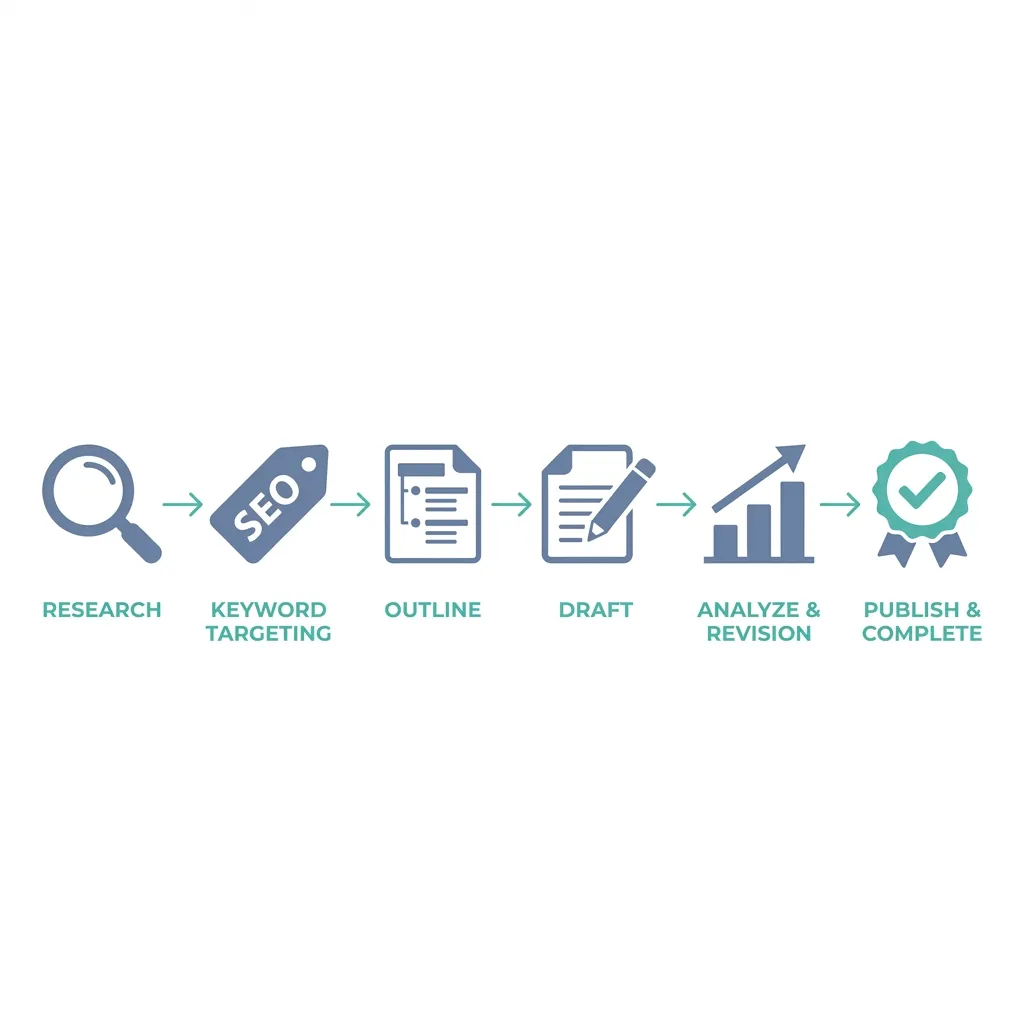
The Full Content Writing Toolkit: What the Workflow Actually Looks Like
Before looking at specific tools, it helps to map the stages where tools actually intervene. This is the mental model the rest of the article is built on.
Stage 1 — Topic Research and Ideation: Finding what to write about and confirming that an audience is searching for it. Tools: keyword research platforms, ideation tools, search-listening tools.
Stage 2 — Keyword Research: Identifying target keywords, semantic variations, and competitive difficulty. Tools: Ahrefs, Semrush, LowFruits, or integrated pipeline tools with built-in keyword discovery.
Stage 3 — Content Brief: Translating research into a structured writing brief — target keyword, intent, outline, semantic terms, recommended length, and internal link targets. Tools: brief generators, Frase, SEOBoost, or brief templates.
Stage 4 — Drafting: Generating or writing the actual content. Tools: AI writing assistants (Jasper, ChatGPT, Claude, Writesonic), or SEO-integrated platforms like Veldora’s strategy-backed writing pipeline.
Stage 5 — SEO Optimization: Scoring a draft against SERP targets, filling semantic keyword gaps, and benchmarking against competing pages. Tools: Surfer SEO, Frase, Clearscope, MarketMuse.
Stage 6 — Editing and Polish: Improving grammar, readability, sentence structure, and tone before publication. Tools: Grammarly, Hemingway Editor, ProWritingAid.
A solo blogger who relies only on ChatGPT skips stages 1 through 3 entirely, and often stage 5 and 6 as well. The result is technically written content that does not rank, does not hold the reader’s attention, and drifts from the intended topic. That is not an AI problem — it is a workflow problem.
Master Reference: All Recommended Tools at a Glance
Use this table as your quick-scan reference. The sections below go deeper on each category.
Note: All pricing is subject to change. Verify current pricing on each tool’s official site before purchasing.
| Tool | Category | Free Tier | Starting Price | Best For | Key Limitation |
|---|---|---|---|---|---|
| ChatGPT | AI Writing | Yes (GPT-3.5) | ~$20/mo (Plus) | Flexible drafting, custom instructions | No built-in SEO or brief structure |
| Claude | AI Writing | Yes (limited) | ~$20/mo (Pro) | Longer context, nuanced tone | No native SEO integration |
| Jasper | AI Writing | No (trial only) | ~$49/mo | Structured templates, team use | Expensive for solo users; output still needs editing |
| Writesonic | AI Writing | Yes (limited) | ~$16/mo | Budget-conscious AI drafting | Quality variance across content types |
| Surfer SEO | SEO Optimization | No | ~$89/mo | Content scoring and SERP benchmarking | Pricing is high for low-volume publishers |
| Frase | SEO Optimization | Limited trial | ~$45/mo | Brief creation plus content optimization | SERP data depth below Surfer at entry tier |
| Clearscope | SEO Optimization | No | ~$189/mo | Agency and in-house SEO teams | Expensive; overkill for solo bloggers |
| Grammarly | Grammar and Editing | Yes | ~$12/mo (Pro) | Grammar, tone, and style correction | Free tier is limited; AI detection flagging in some drafts |
| Hemingway Editor | Readability | Yes (web) | $19.99 one-time (app) | Sentence structure and readability | No grammar checking; no cloud sync |
| ProWritingAid | Deep Editing | Yes (limited) | ~$30/mo | Long-form editorial feedback | Learning curve; interface is dense |
| Ahrefs | Keyword Research | No (limited tools) | ~$129/mo | Comprehensive SEO and competitor research | Cost prohibitive for solo bloggers |
| Semrush | Keyword Research | Limited free | ~$140/mo | Full SEO suite with content tools | Expensive; many features unused by content-only teams |
| LowFruits | Keyword Research | Yes (credits) | ~$25/mo | Finding low-competition keywords quickly | Narrower data set than Ahrefs or Semrush |
| Perplexity | Research and Ideation | Yes | ~$20/mo (Pro) | Real-time web research for topic grounding | Not a writing tool; output requires human structuring |
AI Writing Tools: What They Actually Have in Common (and Where They Differ)
Here is a claim that surprises some buyers: most commercial AI writing tools are built on the same small set of underlying models — primarily GPT-family models and Anthropic’s Claude. This is why output quality feels similar across platforms. You are not choosing between fundamentally different AI technologies. You are choosing between workflow environments built on similar foundations.
That framing matters because it redirects the evaluation question. The right question is not “which tool has the best AI?” It is “which workflow fits mine?”
The real differentiators are:
- Brand voice memory — Can the tool retain tone, terminology, and style preferences across projects?
- SEO keyword integration — Does the tool accept a target keyword and weave it structurally into the output, or just into the text?
- Template libraries — Does the tool offer structured starting points for specific content formats?
- Team collaboration — Can multiple writers share assets, brand settings, and draft history?
- Interface quality — How much friction exists between input and usable draft?
ChatGPT remains the most flexible option for writers who know how to prompt well. With custom instructions enabled, it can approximate brand voice across sessions. It has no native SEO integration and no structured brief workflow — but for a freelancer producing varied client content, that flexibility often outweighs a structured tool’s rigidity. Free tier is available; GPT-4 access requires the ~$20/month Plus plan.
Claude handles longer context windows better than most alternatives, which matters for writers who need to feed in lengthy briefs, style guides, or reference documents. Tone tends toward natural prose. Like ChatGPT, it has no built-in SEO layer. Free tier exists with usage limits; Pro is ~$20/month.
Jasper is built for teams and structured production workflows. Its template library is genuinely useful for content marketers who write in consistent formats. The tradeoff: it is priced for teams (~$49/month and up), the output still requires substantive editing, and a solo blogger can accomplish most of the same output with ChatGPT at half the cost or less.
Writesonic sits at a more accessible price point (~$16/month) with a free tier. Output quality is serviceable but uneven across content types — it performs better on shorter formats than on long-form SEO articles.
On editing overhead: AI drafts are not finished content. A realistic estimate for a 1,000-word AI-generated blog post is 20–40 minutes of editing to fix factual inaccuracies, flatten generic sentence patterns, and bring the voice to match publication standards. How much editing depends on how detailed the brief was — which is the argument for investing in the research stage before the drafting stage.
On AI detection risk: AI content detection tools exist, but their accuracy is inconsistent. Published research on AI detection reliability documents meaningful false-positive rates — meaning human-written content can be flagged as AI-generated. Google’s stated position focuses on content quality and usefulness, not on whether AI was involved in production. The practical implication: publish well-edited, factually grounded content rather than treating detection avoidance as a publishing strategy.
SEO Content Optimization Tools: When You Actually Need One
AI writing tools generate text. SEO content optimization tools analyze the competitive SERP environment and tell you whether that text is likely to rank. These are not the same function, and conflating them is one of the most common mistakes in content tool evaluation.
What SEO content optimization tools actually do:
- Crawl the top-ranking pages for your target keyword
- Extract the semantic keywords, topics, and heading structures those pages use
- Score your draft against that SERP benchmark
- Identify gaps — terms your draft is missing that competitors cover
None of this is native to ChatGPT, Jasper, or most AI writers.
Who actually needs these tools: High-volume SEO teams, content agencies, and in-house content marketers publishing in competitive niches. If you are publishing two blog posts a month as a casual blogger, a $89–189/month SEO tool is hard to justify. If you are producing 10+ SEO-targeted pieces monthly with measurable ranking goals, skipping this layer is the more expensive choice over time. For the long-term argument on why consistent SEO content compounds, this post on SEO content strategy covers the mechanics without rehashing them here.
Surfer vs. Frase vs. Clearscope
| Tool | Starting Price | Free Tier | Best Use Case | Key Limitation |
|---|---|---|---|---|
| Surfer SEO | ~$89/mo | No | Content scoring, NLP optimization, SERP benchmarking for established SEO teams | High cost; steep learning curve for new users |
| Frase | ~$45/mo | Limited trial | Brief creation plus optimization in one workflow; good for mid-size teams | SERP data depth is lighter than Surfer at entry tier |
| Clearscope | ~$189/mo | No | Agency and in-house teams needing clean, shareable content reports | Expensive; overkill for solo or low-volume publishers |
The distinction worth naming: Frase is stronger as a brief-generation tool that also includes optimization. If you want one tool to handle research briefing and SEO scoring, Frase is the more efficient choice. Surfer is stronger as a pure optimization and scoring tool for teams that already have a research workflow. Clearscope is the cleanest interface and the most expensive — it earns its place in agency workflows where multiple stakeholders review content scores, less so for individual writers. You can review current Surfer SEO pricing directly on their site before committing.
MarketMuse deserves a mention for content planning at scale — it maps topical authority gaps across an entire site, not just individual articles. Entry pricing is higher than Surfer or Frase; it is most relevant for content strategists planning large editorial programs rather than writers optimizing individual posts.
Grammar, Readability, and Editing Tools: The Layer Most Writers Skip
If you are publishing AI-generated content without a readability pass, you are publishing a first draft. This is not a minor quality issue — it is the difference between content that retains readers and content that loses them in the second paragraph.
AI-generated text has recognizable patterns: passive constructions, overly long compound sentences, transitions that connect ideas without moving them forward, and a flatness that reads like confident filler. Readability tools catch these patterns faster than a human editor scanning quickly.
Grammarly
Pros:
- Catches grammar errors, punctuation issues, and awkward phrasing in real time
- Tone detector helps align output with intended register
- Browser extension and Google Docs integration make it practically frictionless
- Free tier covers basic grammar and spelling
Cons:
- Free tier misses style-level issues; paid tier (~$12/month) is where it earns its place
- Some AI-generated content triggers Grammarly’s own AI detection flags — be aware of this in editorial review
- Can over-suggest changes that flatten distinctive voice
Best for: Any writer who wants real-time grammar and tone feedback in their existing writing environment. Especially useful as a first pass on AI-generated drafts before deeper editing.
Hemingway Editor
Pros:
- Instantly highlights complex sentences, passive voice, and adverb overuse
- Free to use in the browser; one-time ~$19.99 purchase for the desktop app
- No subscription, no account required for web use
- Particularly effective at identifying AI-generated sentence bloat
Cons:
- Does not check grammar or spelling — it is a readability tool, not a grammar checker
- No cloud sync or collaboration features
- Can flag stylistic complexity that is intentional and appropriate — requires editorial judgment
Best for: A quick readability pass on any draft, AI-generated or human-written. A Hemingway pass on a 1,000-word AI draft will typically surface 5–10 complex sentences and 3–5 passive constructions — small fixes with a real impact on how the content reads.
ProWritingAid
Pros:
- Deep editorial analysis: consistency, pacing, dialogue tags, repeated phrases, and style reports
- Strong free tier worth evaluating before paying
- Best-in-class for long-form work where pattern analysis across the full document matters
- Integrates with Scrivener, Word, and Google Docs
Cons:
- Interface is dense; takes time to learn which reports are relevant to your use case
- Overkill for short-form content or social copy
- ~$30/month for full access; lifetime license available
Best for: Writers producing long-form content — articles above 1,500 words, white papers, ebooks — who want editorial depth beyond what Grammarly provides. The free tier is genuinely usable for occasional use.
Research, Ideation, and Content Brief Tools: The Stage Most Writers Rush
The research stage is the most skipped and the most consequential part of the content writing workflow. There is a direct causal relationship worth stating plainly: the quality of an AI-generated draft is proportional to the quality of the brief that preceded it. A vague prompt produces vague content. A detailed brief — with a defined keyword, mapped intent, semantic terms, audience stage, and structural outline — produces a draft that needs editing, not a rewrite.
Keyword research tools serve a specific function at this stage: they tell you whether a topic has a real search audience, how competitive the landscape is, and what related terms belong in the content.
- Ahrefs and Semrush are the comprehensive options — deep data, competitor gap analysis, and keyword difficulty scoring. Ahrefs starts around $129/month; Semrush around $140/month. Both are priced for teams with active SEO programs, not casual bloggers.
- LowFruits (~$25/month, with free credits available) focuses specifically on finding low-competition keyword opportunities — useful for newer sites that cannot realistically target high-difficulty terms yet.
- Perplexity (free tier available, ~$20/month for Pro) is useful for real-time topic research — getting a current, source-cited orientation to a topic before writing. It is not a keyword tool, but it is a faster research starting point than a blank search bar.
Content brief tools are the underserved sub-category that most guides skip entirely. Frase’s brief mode generates a structured content outline using SERP data. SEOBoost offers similar brief-generation functionality. For teams using Veldora, keyword research is built into the content pipeline — the brief generation happens as part of the workflow rather than as a separate tool subscription.
Before You Draft Anything: What a Strong Content Brief Includes
- Target keyword and search intent clearly defined (informational, commercial, transactional)
- Competitor content gaps identified — what top-ranking pages cover and where they fall short
- Semantic keywords and related topics listed — not just the primary keyword
- Audience stage and sophistication noted — beginner, intermediate, or advanced reader
- Recommended word count and structural outline (H2s, H3s, key sections)
- Internal linking targets identified — existing pages the new content should reference
- Brand voice and tone notes included — especially critical for AI-generated drafts
If your AI drafts consistently feel off-topic, generic, or structurally weak, the brief is almost always the problem — not the AI tool.
Choosing Your Stack: A Tool Recommendation by Writer Type
There is no universal best stack. But there is a right answer for your specific situation. Use this matrix to find your profile, then read the notes below for context on each recommendation.
| Writer Type | Primary Need | Recommended Stack | Budget Path |
|---|---|---|---|
| Solo Blogger | Affordable drafting, basic SEO, readability | ChatGPT (custom instructions) + Hemingway Editor + Grammarly free + LowFruits | Free-first: ChatGPT free tier + Hemingway web + Grammarly free |
| Freelance Writer | Brand flexibility, varied client formats, low overhead | Claude or ChatGPT + ProWritingAid + Grammarly Pro | Free-first: Claude free + Hemingway + Grammarly free |
| In-House Content Marketer | SEO-first output, competitive keyword targeting, moderate volume | Frase or Surfer SEO + AI writer (Jasper or ChatGPT) + Grammarly Pro | Start with Frase at ~$45/mo; add Grammarly Pro |
| Content Agency | Scale, collaboration, white-label output, multi-client workflows | Full pipeline solution (e.g., Veldora) or Surfer + Jasper + Grammarly teams plan | Pipeline solution often simpler than a 4-tool stack at agency volume |
Solo bloggers on a tight budget can cover most of the workflow before spending a dollar: Google Search Console for keyword signals, ChatGPT with custom instructions for drafting, Hemingway Editor in the browser for readability, and Grammarly free for grammar. That covers stages 2, 4, and 6 of the workflow — which is where most content quality is won or lost.
Freelance writers need brand flexibility more than structured templates. ChatGPT or Claude with well-maintained custom instructions will serve varied client work better than a template-heavy tool like Jasper. Add ProWritingAid for longer-form editorial depth on client deliverables.
In-house content marketers working in competitive niches should treat an SEO content optimization tool as a required line item, not a nice-to-have. The question is whether Frase (more affordable, brief-plus-optimization) or Surfer (deeper scoring, higher cost) fits the output volume. At 5–10 articles per month in a competitive niche, either tool earns its cost. Below that threshold, the ROI is less clear.
Content agencies face a different problem: it is not which tools to use, it is how many subscriptions and logins to manage before the stack becomes a coordination burden. A multi-tool stack — Surfer + Jasper + Grammarly + Ahrefs — covers the workflow stages but requires workflow management to hold it together. An integrated pipeline like Veldora’s strategy-backed content system is a legitimate alternative — one pipeline covering keyword research, brief generation, SEO-aligned writing, and multi-step QA without the overhead of four separate subscriptions.
If assembling and managing that stack sounds like more operational work than you want to take on, that is what a pipeline solution is designed for. Generate a real, strategy-backed post on the free demo and read it yourself — before you spend a dollar. No credit card. No contracts. Just proof.
Frequently Asked Questions
What is the best free tool for content writing?
No single free tool covers the full workflow, but a combination of free tiers covers most of it: ChatGPT’s free tier for drafting, Hemingway Editor (free in browser) for readability, and Grammarly’s free tier for grammar. For keyword research, Google Search Console provides useful signal data at no cost. LowFruits offers a limited free credit allocation for keyword discovery. Before paying for anything, build with free tiers and identify where the gaps actually hurt your output.
Are AI writing tools just expensive wrappers around ChatGPT — and if so, why pay for them?
In many cases, yes — most commercial AI writing tools are built on the same underlying models. What you are paying for is the workflow environment: brand voice memory, SEO keyword integration, template libraries, and team collaboration features. If you are disciplined about maintaining your own custom instructions and prompting system in ChatGPT, you may get equivalent output at a lower cost. The case for a premium AI writing tool is strongest when the workflow features — not the generation quality — are what you actually need.
Can AI-generated content be detected, and does it affect my site’s SEO rankings?
AI content detection tools exist, but they are not reliable. Research on detection accuracy documents significant false-positive rates — human-written content regularly gets flagged as AI-generated. Google’s quality guidelines focus on content helpfulness and expertise, not on the production method. The practical guidance: publish well-edited, factually accurate, genuinely useful content. Trying to optimize for detection avoidance is not a sound publishing strategy and is not necessary for ranking.
How much editing do AI-generated drafts actually require before they’re usable?
Realistic estimate: 20–40 minutes of editing for a 1,000-word post, assuming a reasonably detailed brief was used. That estimate assumes you are fixing factual inaccuracies, flattening generic sentence patterns, improving transitions, and aligning voice to publication standards. With a weak brief, the editing overhead can exceed the time it would have taken to write from scratch. The brief is the leverage point.
How many content writing tools do I actually need?
Two or three, covering different workflow stages. A typical minimal stack: one AI drafting tool, one readability or grammar editor, and — if you are publishing SEO content — one keyword research or SEO optimization tool. You do not need one tool per workflow stage. You do need to make sure the stages are covered. The gap most writers leave is the research and brief stage, not the drafting stage.
What is the difference between a grammar tool and a readability tool?
A grammar tool (Grammarly) catches errors: misspellings, punctuation mistakes, subject-verb disagreement, and awkward phrasing. A readability tool (Hemingway Editor) catches structural patterns that make text hard to read: overly complex sentences, excessive passive voice, weak adverbs, and dense paragraph construction. Both are useful; they catch different things. For AI-generated content specifically, readability tools are often more valuable — AI output is usually grammatically correct but structurally verbose. You likely need both.
Do I need both an AI writing tool and an SEO content optimization tool?
If you are actively trying to rank content in competitive search, yes — these tools do different things. An AI writer generates text; an SEO optimization tool evaluates whether that text covers the right topics at the right depth relative to what is already ranking. If you are not publishing with SEO ranking as a primary goal, an SEO content optimization tool is probably not worth the cost. Know which goal you are writing for before subscribing to a $90+/month optimization tool.
← Back to all posts