Content Writer Tools Compared by Workflow Stage (2026)
By Veldora AI · July 11, 2026 · Updated July 11, 2026
The Best Content Writer Tools in 2026: AI, SEO, and Editing Tools Compared by Use Case
Most content writer tool roundups are built for the publisher, not the reader. They’re AI-tool-only lists with the site’s own product at the top, and they treat a solo freelancer the same as a 10-person marketing team.
The result: you leave with a longer list of tools to research, not a shorter list of tools to buy.
According to HubSpot’s marketing industry trends research, content teams are actively evaluating and adopting a wider range of tools — but adoption doesn’t automatically mean the right tools are being chosen for the right problems.
This guide takes a different approach. Before listing a single tool, it helps you identify which category of tool you actually need. Then it compares specific tools honestly — including their real limitations — and closes with a concrete, role-based stack recommendation for four distinct writer types.
Most writers don’t need more tools. They need fewer, better-matched ones.
Key Takeaways
- There are four distinct content writer tool categories — AI drafting, SEO optimization, grammar/editing, and research — and they solve different problems. Picking from the wrong category wastes money.
- ChatGPT is the most flexible and cheapest AI drafting option; paid tools like Jasper add workflow structure that only pays off at volume.
- No AI draft is publish-ready. Every tool in the AI drafting category requires significant human editing before the content goes live.
- SEO optimization tools (Surfer SEO, Clearscope) are not AI writing tools — they tell you what your content needs to rank, based on live SERP data. If your content isn’t ranking, this is probably the category you’re missing.
- Most writers need two or three tools that cover different problems, not six tools from the same category. The role-based stack section below tells you which combination fits your workflow.
What Type of Content Writer Tool Do You Actually Need?
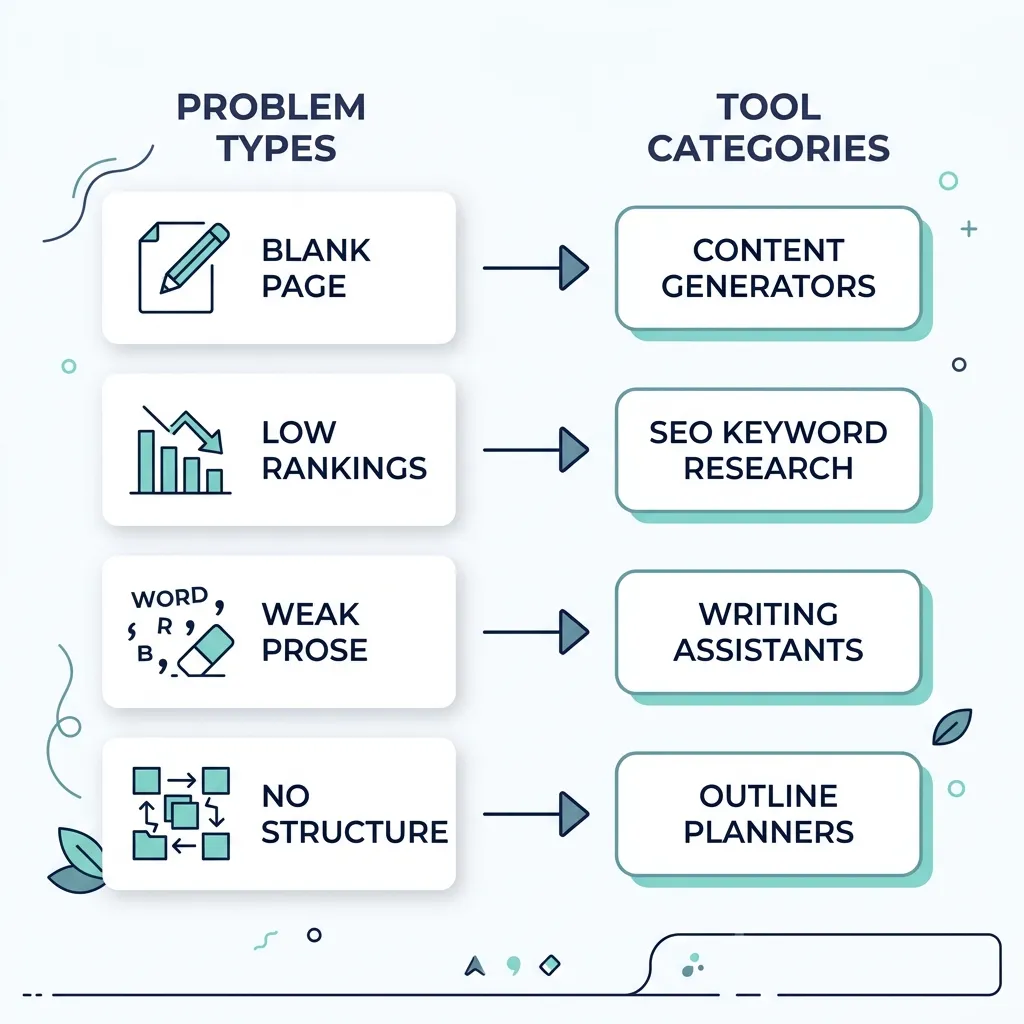
Before you evaluate any individual tool, you need to know which category of problem you’re trying to solve. This is where most writers go wrong — they buy another AI drafting tool when their real problem is that their finished posts don’t rank. Or they add Copy.ai to a stack that already includes ChatGPT and Jasper — three tools running on variations of the same underlying model, solving the same problem three times.
There are four distinct tool categories worth knowing:
AI drafting tools solve blank-page paralysis. They generate content structure, first drafts, and copy variations based on your prompts. They do not do keyword research or SERP analysis. Output requires editing.
SEO optimization tools solve ranking problems. They analyze live SERP data and tell you what your content needs — specific terms, depth, structure, competitor benchmarks — to compete for a given keyword. They don’t draft content for you.
Grammar and editing tools solve prose quality problems. They catch errors, flag passive voice, score readability, and highlight overlong sentences. They do not generate content or run SEO analysis.
Research and brief tools solve the planning and structure problem. They help you build a content brief before drafting — pulling keyword data, identifying content gaps, and surfacing what competitors cover that you don’t.
Most writers need tools from two of these categories, not ten tools from the same one. The decision prompt is simple: identify your actual bottleneck first.
| If your problem is… | Tool category you need | Example tools |
|---|---|---|
| Blank page / slow drafting | AI drafting tool | ChatGPT, Jasper, Copy.ai |
| Content not ranking | SEO optimization tool | Surfer SEO, Clearscope, SEOBoost |
| Weak or error-prone prose | Grammar / editing tool | Grammarly, Hemingway, ProWritingAid |
| No research or content structure | Research / brief tool | Veldora AI (publisher), MarketMuse, Frase |
Best AI Drafting Tools for Content Writers
AI drafting tools are the most crowded and most misunderstood category. The core confusion: ChatGPT, Jasper, Copy.ai, and many others all run on GPT-4 or a close variant. The underlying model is often the same. What paid tools add is workflow structure — templates, tone controls, brand voice settings, and output formatting. Whether that structure is worth paying for depends almost entirely on your content volume and how often you’d build that structure yourself anyway.
Here’s the honest comparison:
| Tool | Best for | Free tier | Paid plan from | Editing burden |
|---|---|---|---|---|
| ChatGPT | Flexible, prompt-driven drafting | Yes (GPT-3.5) | ~$20/mo | High |
| Jasper | Marketing copy at volume | 7-day trial | ~$49/mo | Medium |
| Copy.ai | Short-form and campaign copy | Yes (limited) | ~$49/mo | Medium |
| Rytr | Budget drafting for simple content | Yes | ~$9/mo | High |
Pricing sourced from published plan pages; verify current rates before purchasing.
ChatGPT is the most flexible option here — and the cheapest. The tradeoff: you supply the structure, the research direction, and the editorial judgment. The AI supplies words. A ChatGPT blog draft tends to be structurally flat — it follows the path of least resistance through a topic rather than building toward a clear argument. That’s a significant editing job, especially for longer-form content.
Jasper adds templates and workflow guardrails that are genuinely useful if you’re producing high volumes of similar content (landing pages, product descriptions, campaign emails). If you’re writing two blog posts a month, the $49/mo entry price is hard to justify over ChatGPT’s $20 plan. The output quality ceiling is similar — the difference is structure, not substance.
Copy.ai is best suited to short-form work: ad copy, email subject lines, social captions, CTA variants. It’s not a blog drafting tool and shouldn’t be used as one. Its free tier is limited enough that it’s more of a trial than a working option.
Rytr is the budget option for simple, short content tasks. The output is functional but requires heavy editing before anything goes near a client or a live URL.
The honest answer to “do I need a paid AI writing tool if I already use ChatGPT?” is: probably not, unless you’re producing at volume and find yourself rebuilding the same prompts and structures repeatedly. Paid tools solve the workflow friction problem, not the quality problem.
For SMBs or agencies looking for AI-assisted writing that’s paired with live research and keyword strategy from the start — rather than assembling that layer separately — Veldora’s strategy-backed writing approach combines drafting with SEO alignment in a single pipeline. Disclosure: Veldora is the publisher of this article.
Best SEO Optimization Tools for Content Writers
This is the category most writers skip — and the most common reason good content doesn’t rank.
SEO optimization tools are not AI writing tools. They don’t draft anything. What they do is analyze the live SERP for your target keyword and tell you what a competing piece of content needs to include: specific terms, related concepts, structural depth, word count benchmarks, and gaps your competitors cover that your draft doesn’t. A writer who gets a Surfer SEO score back and discovers their 1,500-word post is missing 12 semantically related terms their competitors all include — that’s this category doing its job.
If you’re using ChatGPT to draft content but the posts aren’t ranking, you almost certainly need an SEO optimization tool, not a better AI drafter.
| Tool | What it analyzes | Key feature | Starting price | Best fit |
|---|---|---|---|---|
| Surfer SEO | Live SERP + NLP scoring | Content editor with real-time scoring | ~$89/mo | In-house bloggers, teams |
| Clearscope | NLP keyword grading | Google Docs integration | ~$170/mo | Teams, agencies |
| Semrush Writing Assistant | On-page SEO + readability | Built into Semrush suite | Included with Semrush plans | Teams already using Semrush |
| SEOBoost | Content briefs + optimization | Topic research + reporting | ~$39/mo | Freelancers, budget-conscious teams |
Pricing sourced from published plan pages; verify current rates before purchasing.
Surfer SEO is the most widely adopted tool in this category for a reason — the content editor is practical, the SERP data is live, and it integrates with Google Docs and WordPress. The ~$89/mo entry price is a real barrier for solo freelancers producing occasional content, but for in-house teams publishing on a consistent schedule, it pays for itself quickly.
Clearscope is the enterprise-grade option. The NLP grading system is precise, and the Google Docs integration fits neatly into team workflows. The $170/mo starting price makes it agency or mid-market territory.
Semrush Writing Assistant is a pragmatic choice if your team already pays for Semrush — it adds on-page optimization and readability scoring without a separate subscription. If you’re not already a Semrush user, the combined cost is hard to justify for writing optimization alone.
SEOBoost is worth knowing about for budget-conscious freelancers or small teams. It covers content briefs and optimization reporting at a significantly lower price point than Surfer or Clearscope. The depth of SERP analysis is lighter, but for writers working on lower-competition topics, it covers the essentials.
None of these tools has a meaningful free tier. This is a paid-only category — build it into your budget explicitly. Why this investment matters long-term is worth understanding: consistently optimized content compounds in SEO value over time in ways that un-optimized drafts simply don’t.
Best Grammar, Editing, and Readability Tools
This is the category AI-focused roundups skip most often, which is why so much AI-assisted content reads exactly like AI-assisted content.
AI drafting tools generate text. Editing tools make it publishable. Treating these as the same layer is how you end up with technically correct but tonally flat, overlong, passively written content sitting on your CMS.
There are two distinct tool types here: grammar checkers (catch errors) and readability tools (improve sentence structure and clarity). They solve different problems and work best together.
Grammarly
Pros:
- Free tier catches spelling, grammar, and punctuation errors — genuinely useful, not a watered-down demo
- Browser extension works across most writing environments without friction
- Paid plan adds style and clarity suggestions, tone detection, and plagiarism checking
Cons:
- Paid plan ($12–$15/mo) is useful but not essential for every writer — the free tier handles most of what non-professional writers need
- Style suggestions are sometimes over-aggressive and can flatten a deliberate writing voice
- Does not improve structural or argumentative problems — it catches surface errors, not thinking errors
Hemingway Editor
Pros:
- Free to use in the browser version — no account required
- Scores readability directly and highlights specific sentence-level problems (too long, too complex, passive voice)
- Fast, low-friction review step that takes under five minutes for a typical blog post
Cons:
- Does not catch grammar or spelling errors — it’s a readability tool, not a grammar checker; pair it with Grammarly, not instead of it
- The desktop app costs ~$19.99 one-time, which is reasonable but unnecessary if the browser version meets your needs
- Can push writers toward shorter, simpler sentences in cases where complexity is warranted — apply judgment, not just the score
ProWritingAid
Pros:
- Comprehensive style, grammar, and readability reports in one tool — the most thorough editing tool in this category
- Integrates with Google Docs, Scrivener, and Word
- Useful for writers producing high volumes of long-form content where consistency matters
Cons:
- Free tier is severely limited — the full value is behind the paid plan (~$20/mo or $120/yr)
- The depth of the reports can slow down writers who need quick, editorial turnaround rather than comprehensive style analysis
- Steeper learning curve than Grammarly or Hemingway — not the right choice for a quick editing pass
Grammarly and Hemingway together cost less than a single cup of coffee per week and cover the majority of what a professional editor catches at the surface level. For most writers, that combination handles the editing layer completely.
Recommended Tool Stacks by Writer Role
You don’t need six tools. You need two or three that cover different problems without overlapping. Here’s what that looks like across four common writer profiles.
| Writer profile | Recommended tools | Est. monthly cost | Primary workflow benefit |
|---|---|---|---|
| Solo freelancer (budget-conscious) | ChatGPT + Grammarly (free tier) | ~$20 | Drafting + error correction with minimal spend |
| In-house blogger | ChatGPT + Surfer SEO | ~$109 | SEO-aligned drafting with live SERP benchmarking |
| Marketing team | Jasper + Clearscope + ProWritingAid | ~$240–$260 | Volume drafting + NLP scoring + style consistency |
| SEO content agency | Veldora AI (full pipeline) | Contact for pricing | Strategy, writing, and QA in one workflow — no tool assembly required |
Estimated costs based on published entry-level plan pricing at time of writing.
Solo freelancer: ChatGPT at $20/mo handles drafting with the right prompting discipline. Grammarly’s free tier handles error correction. This stack covers drafting and editing without redundant spend. If rankings become a priority, add SEOBoost (~$39/mo) before upgrading to any fancier AI tool.
In-house blogger: The combination of ChatGPT for drafting and Surfer SEO for optimization covers the two most common failure points — blank page and poor rankings — without significant overhead. These two tools solve different problems and don’t overlap.
Marketing team: At content volume, Jasper’s templates reduce the per-piece prompting burden. Clearscope’s NLP grading ensures output meets SERP requirements. ProWritingAid enforces style consistency across multiple writers. These three tools cover drafting, SEO alignment, and editorial quality without redundancy.
SEO content agency: Assembling and managing four separate tools across client accounts creates coordination overhead that compounds at scale — mismatched outputs, inconsistent brief formats, manual QA steps. Disclosure: Veldora is the publisher of this article. Veldora’s automated SEO content pipeline runs strategy, keyword research, brand-matched writing, and multi-step QA in a single workflow — designed for SMBs and agencies that need consistent content production without the overhead of managing individual point tools. Generate a real, strategy-backed post on the free demo and read it yourself — before you spend a dollar. No credit card. No contracts. Just proof.
What to Watch Out for When Using AI Content Tools
The writers who get the most out of AI tools are the ones who treat AI output as a first draft that needs a real editor — not a finished product that needs a quick proofread.
Here’s what goes wrong when that distinction gets blurred.
Hallucination is a real and consistent risk. AI tools confidently produce false statistics, misattributed quotes, and invented research sources. A content team that publishes an AI-generated post citing a study that doesn’t exist gets corrected by a reader, not an editor — and that correction is public. Fact-checking every statistic and named source in an AI draft is not optional. It’s a non-negotiable step in the workflow.
Thin content and SEO risk. AI tools optimize for fluency, not depth. The output tends to cover topics broadly and shallowly — padding with obvious points rather than adding information density where it matters. Publishing AI drafts without significant editing risks producing content that ranks poorly, earns low dwell time, and damages brand credibility over time. Google’s own guidance on AI-generated content is clear: the quality and helpfulness of the content is what’s evaluated, not the method used to produce it. Low-quality content that happens to be AI-generated is still low-quality content.
Content ownership and data privacy. Enterprise writers and agencies using AI tools on client work need to review the IP terms and data retention policies of every tool in the stack. Some tools train on user inputs by default. This matters when the content involves proprietary information, client brand assets, or unpublished campaign strategy.
AI tools accelerate drafting; they do not replace editorial judgment. Brand voice, research accuracy, structural argument, and genuine usefulness to the reader are all things the writer brings. The AI brings words. That distinction determines whether the output is an asset or a liability.
Before you publish AI-assisted content, check:
- Fact-check any statistics, claims, or named sources — AI tools hallucinate both
- Read for brand voice — generic output sounds like everyone else’s content
- Verify the article answers the actual search query, not just the keyword
- Check for thin sections where the AI padded instead of adding depth
- Run through your grammar or readability tool — AI drafts are not clean drafts
- Confirm you own the output — review the tool’s data and IP terms
Frequently Asked Questions
What is the best free content writing tool for beginners?
For drafting, ChatGPT’s free tier (GPT-3.5) is the most capable free option available. Pair it with the Hemingway Editor (free, browser-based) for readability and Grammarly’s free tier for error correction. That three-tool stack costs nothing and covers drafting, clarity, and grammar — which is everything a beginner needs to produce publishable content.
Do I need both an AI writing tool and an SEO optimization tool?
Yes, if ranking is the goal. AI drafting tools generate content based on prompts — they don’t analyze live SERP data or tell you what terms and depth your content needs to compete. SEO optimization tools like Surfer SEO or Clearscope do that. The two categories solve different problems. Using only an AI drafter without SEO optimization is a common reason well-written content still doesn’t rank.
Is ChatGPT good enough, or do I need a paid AI writing tool?
For most writers, ChatGPT is good enough. Paid tools like Jasper add workflow templates and structure — useful at high content volume, unnecessary for occasional use. The underlying model quality is similar across most paid AI writing tools. If you’re producing more than 20–30 pieces of content per month and finding yourself rebuilding prompts repeatedly, paid tools start to justify their cost. Below that threshold, the free or $20/mo ChatGPT plan is hard to beat on a cost-per-draft basis.
Will using AI writing tools hurt my SEO rankings?
AI-generated content doesn’t automatically hurt rankings — low-quality content does. Google evaluates helpfulness and depth, not production method. The risk with AI tools is publishing thin, unedited drafts that don’t genuinely answer the reader’s question. AI content that’s been properly edited, fact-checked, and SEO-optimized performs no differently than content written without AI assistance. The editorial step is what determines quality, not the drafting method.
How many content writer tools do I actually need?
Two to three, covering different categories. A solo freelancer can cover the full workflow with an AI drafter and a grammar tool. An in-house blogger adds an SEO optimization tool. A marketing team might add a style consistency tool at volume. The mistake is adding more tools within the same category — three AI drafting tools solve the same problem three times and add cost without adding workflow coverage.
What content writer tools work inside Google Docs or WordPress?
Grammarly integrates with both Google Docs and most browser-based editors including WordPress. Surfer SEO offers a Google Docs integration. Semrush Writing Assistant also works within Google Docs via add-on. ProWritingAid integrates with Google Docs. Hemingway Editor is browser-based only — you paste content in rather than working inside your existing editor.
Which tools are redundant and which are genuinely complementary?
Redundant: ChatGPT + Jasper + Copy.ai (all AI drafters, same underlying problem). Genuinely complementary: ChatGPT (drafting) + Surfer SEO (SEO optimization) + Grammarly (error correction) — three tools that cover three different workflow stages without overlap. The test for redundancy is simple: do both tools solve the same problem? If yes, pick one and drop the other.
← Back to all posts