How to Use AI for Content Writing: A Realistic Workflow Guide
By Veldora AI · July 19, 2026

How to Use AI for Content Writing (What Works, What Doesn’t, and How to Build a Real Workflow)
Most articles about AI for content writing follow the same pattern: a ranked list of tools, a summary of features, and a vague conclusion that one of them is “best for your needs.” If you’ve read a few of those and still don’t know how to actually use AI in your content process — or whether you should — that’s a reasonable response to bad information.
This article isn’t a tool list. It’s a workflow and decision guide.
It covers what AI writing tools genuinely do well, where they reliably fail, how to prompt them for better output, what a proper human review looks like, and how to evaluate tools against your actual content goals rather than their marketing copy. If you’ve tried an AI writing tool and walked away with generic output or a draft that needed more editing than starting from scratch, that experience is common — and usually fixable with the right approach.
Key Takeaways
- AI writing is most useful for drafting, outlining, and repurposing — not for content requiring factual precision, original research, or expert judgment.
- Better prompts produce better output. Structure, context, and constraints matter more than length.
- Every AI draft requires a structured human review before publishing. This is not optional.
- Google does not penalize content for being AI-generated. It penalizes thin, inaccurate, and unhelpful content — regardless of origin.
- Choosing the right tool starts with your content goal, not the tool’s marketing.
What AI for Content Writing Actually Means (and Why the Distinction Matters)
AI writing is not one thing. Before you evaluate any tool, it helps to identify which of four distinct use modes you actually need:
- Generation — producing new text from a prompt (blog drafts, product descriptions, outlines)
- Editing — refining existing text (rewriting passive sentences, improving clarity, adjusting tone)
- Ideation — brainstorming angles, headlines, structures, and content hooks
- Repurposing — reformatting existing content into new formats (a blog post into an email summary, a transcript into a how-to guide)
These modes require different tools and produce different kinds of output. Most platforms blend them, but most tools are meaningfully stronger in one or two areas. A marketer using AI to generate first-draft blog posts from scratch is doing something categorically different than a writer using AI to rewrite passive voice out of existing copy — even though both are technically “using AI for content writing.”
Why does the distinction matter? Because readers who treat all AI writing tools as interchangeable keep getting inconsistent results. The first step to getting consistent value from AI is knowing which mode you need before you open any tool.
The rest of this article is organized around that principle: use case first, tools second.
Where AI Writing Performs Well — and Where It Doesn’t
No AI writing tool performs equally well across every content type. Treating AI as a general-purpose content machine is the fastest way to generate output that needs more work than the original brief would have taken.
Here’s an honest capability map:
| AI-Friendly Content Tasks | Human-Required Content Tasks |
|---|---|
| Outlines and structural scaffolding | Factual claims requiring source verification |
| First drafts for informational blog content | YMYL topics (health, finance, legal advice) |
| Short-form copy: subject lines, meta descriptions, social captions | Original research, data analysis, proprietary insights |
| Repurposing existing content into new formats | Expert opinion and nuanced brand voice |
| Ideation: angle brainstorming, headline variations | Technical accuracy in specialized domains |
The tasks in the left column share a common characteristic: they require structure and language, but the accuracy bar is lower and the format is more predictable. AI handles these well because it’s pattern-matching against a large body of similar content.
The tasks in the right column require judgment, verification, or genuine expertise. AI can produce text that sounds accurate in these areas — which is exactly what makes it dangerous.
The Failure Modes Worth Knowing
Hallucination is the one that catches people off-guard. AI will generate a named statistic — say, “73% of marketers report increased engagement from AI-assisted content” — with a plausible source attached. The number sounds specific. The source sounds real. Neither may exist. The most dangerous hallucinations aren’t obvious errors; they’re confident-sounding claims that pass a surface read but fail the moment you try to verify them.
Repetitive phrasing shows up in longer drafts. The tool restates the same point in different words across two or three paragraphs, especially in conclusions. It reads fine on a first pass; it feels hollow on a second.
Shallow reasoning is common in analytical content. The AI identifies a topic and lists adjacent points without building an actual argument. The output has the shape of analysis without the substance.
Generic tone is the default register for most AI output — polished, professional, and indistinguishable from a thousand other articles on the same subject. This isn’t a bug; it’s what happens when a model optimizes for average.
Weak prompts make all of these failure modes worse. The most common cause of unusable AI output isn’t the tool — it’s a vague prompt that gives the tool nothing specific to work with.
How to Get Better Output: Prompting and Iteration
The gap between a frustrating AI draft and a useful one is almost always traceable to the prompt. This is good news: prompting is a learnable skill, and a structured approach closes most of the output quality gap without requiring a different tool.
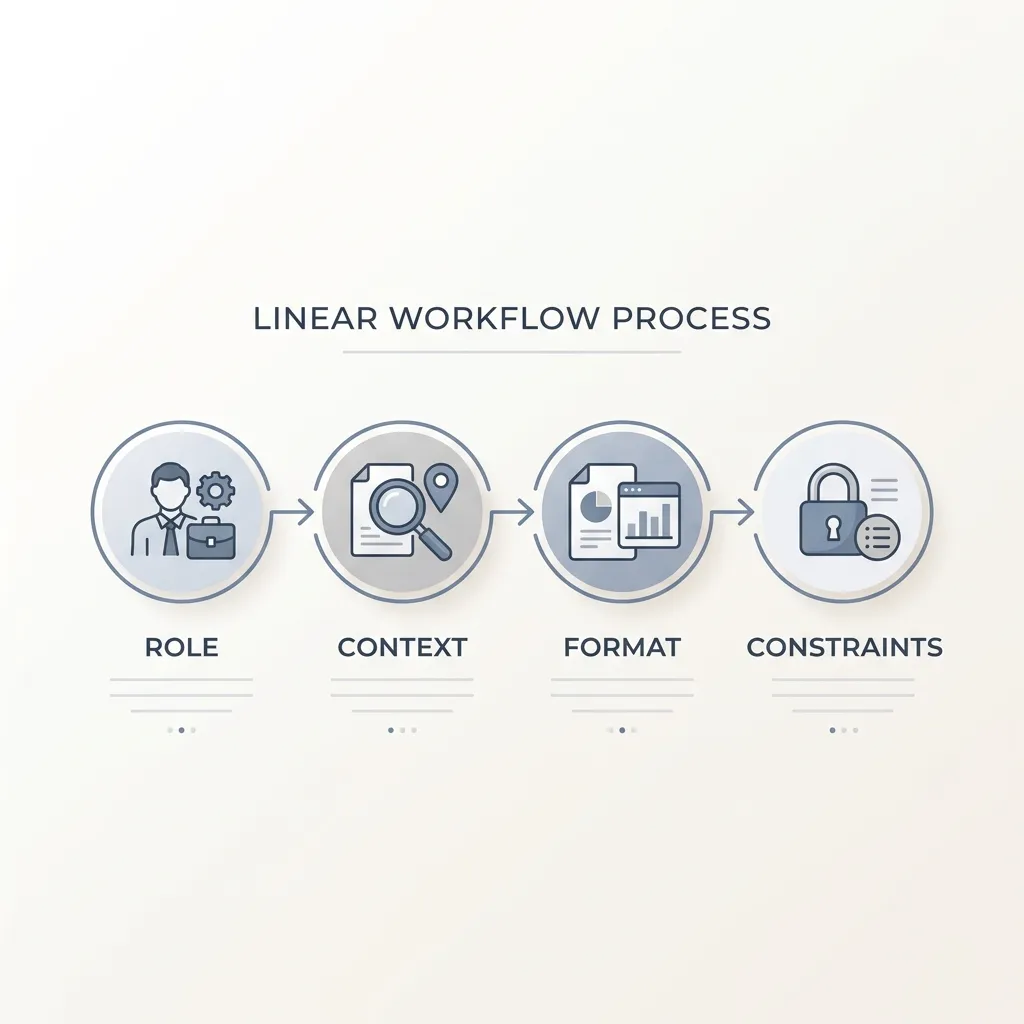
A prompt structure that consistently produces better output:
- Role — Tell the AI what kind of writer it’s acting as. This sets the register, vocabulary level, and default assumptions. “You are a B2B marketing writer with experience writing for skeptical audiences.”
- Context — Provide the specific situation: who the audience is, what they already know, what the content needs to do. Eliminate guesswork. “The reader is a small business owner who has tried email marketing once and seen weak results.”
- Format — Specify the output structure explicitly. Length, heading structure, paragraph count, what to include and exclude. “Write a 150-word introduction. Do not use bullet points. End with a transition into list segmentation.”
- Constraints — Name what you don’t want. Banned words, tones to avoid, length limits, things the draft should not do. “Do not use the word ‘powerful.’ Do not start with a question. Avoid passive constructions.”
Each element eliminates a specific class of generic output. Role prevents a mismatched register. Context prevents the AI from writing for a generic audience. Format prevents an unstructured dump. Constraints prevent the specific defaults you’ve already seen fail.
Weak prompt:
Write an intro for a blog post about email marketing.
The output will be a polished paragraph about how email marketing is one of the most effective channels available, probably mentioning ROI, probably starting with a statistic.
Structured prompt:
You are a B2B marketing writer. Write a 100-word introduction for a blog post targeting small business owners who are skeptical that email marketing works for them. Use a direct, problem-first tone. Do not use the word “powerful.” Do not open with a statistic. End with a transition into a section about list segmentation.
The output will open on the reader’s doubt, address the specific objection, and transition cleanly into the next section. Same tool. Different result.
Treat first-pass output as raw material, not a draft. Iteration — refining the prompt based on what the first output got wrong, or editing the output directly — is the actual skill. Expecting a single prompt to produce something publishable is the wrong frame. Expecting a structured prompt to produce something worth editing is the right one.
The Human Editing Layer: What to Review Before Publishing
AI drafts require a structured human review pass. This isn’t a workaround for a flawed tool — it’s the expected part of the workflow. The editing layer is where brand voice, factual accuracy, and argument quality are actually created.
Teams that skip structured review tend to produce content that sounds okay on the surface and fails on closer inspection: a fabricated citation, a paragraph that restates the previous one, a tone that reads professional-but-generic rather than specifically theirs. The editing pass is what separates content worth publishing from content that fills a word count.
A few specific things worth highlighting:
Fact-check everything verifiable. Every statistic, named source, date, URL, and specific claim in the draft should be confirmed against an actual source before publishing. The most confident-sounding outputs are the ones most likely to contain hallucinated specifics.
Brand voice drifts to the mean. AI defaults to an average of professional content. Sections that read like a vendor whitepaper, a Wikipedia article, or a polite corporate memo are not aligned to your brand voice — they’re aligned to no one’s. Review any section that sounds generic and rewrite it in your actual register. Brand voice controls in your prompting setup can reduce drift, but they don’t eliminate the need for a post-generation audit.
Logical flow is not guaranteed. AI frequently produces well-written paragraphs in the wrong order, or restates a conclusion mid-article, or builds toward a point it never fully makes. Read the draft as an argument, not just as prose.
Before You Publish: AI Draft Review Checklist
- Fact-check all specific claims, statistics, dates, and named sources
- Verify that no fabricated citations or URLs appear in the draft
- Check for brand voice alignment — rewrite sections that sound generic or off-tone
- Review logical flow and transitions between paragraphs
- Confirm the argument or recommendation is coherent end to end
- Run a readability check — cut filler sentences and flatten passive constructions
- Complete a final SEO pass: keyword placement, heading structure, meta description
Editing AI content is not a failure condition. It is the human contribution that makes the content worth publishing. The checklist above is a repeatable tool — use it on every draft, regardless of how clean the initial output looks.
AI Content and SEO: What Google Actually Says
The concern about Google penalizing AI content is widespread, but it’s only partially accurate — and the inaccurate part creates unnecessary fear while missing the actual risk.
Google has stated clearly, through Google Search Central’s official guidance on AI-generated content, that it does not penalize content for being AI-generated. The relevant standard is quality: is the content useful, accurate, and does it demonstrate experience, expertise, authoritativeness, and trustworthiness? Those signals — collectively called E-E-A-T — matter. How the content was produced does not.
Google’s AI Content Stance: The Short Version
- Google does not penalize AI-generated content as a category
- Google does penalize thin, inaccurate, or unhelpful content — regardless of how it was produced
- The quality standard is E-E-A-T: Experience, Expertise, Authoritativeness, Trustworthiness
- Content that exists primarily to fill search volume rather than answer a question is the actual risk
- Unedited AI drafts with factual errors, shallow reasoning, or no original perspective fail this standard
What creates genuine SEO risk is predictable: publishing unedited AI drafts with hallucinated facts, producing high volumes of thin content without original insight, or relying on AI tools that claim to be “SEO-optimized” while generating content without any keyword or competitor grounding. The risk is lazy publishing, not AI authorship.
What reduces risk is equally predictable: human editing for accuracy and depth, demonstrated expertise signals throughout the content, original perspective or data that cannot be found elsewhere, and AI writing grounded in content strategy — not content generated into a void.
AI writing tools that claim to produce “SEO-optimized content” do not guarantee rankings. The output quality, the strategic grounding, and the editing layer determine ranking potential. As covered in more depth in how SEO compounds over time, rankings are driven by consistent, quality-first content strategy — not by the tool used to produce the draft.
How to Choose an AI Writing Tool: A Use-Case-First Framework
Most people choose AI writing tools the wrong way: they read a comparison article, pick the tool with the best marketing copy or the most recognizable name, and discover two weeks later that it doesn’t do what they actually needed.
The better approach starts with your content goal, not the tool’s feature list.
Identify your primary use mode first (generation, editing, ideation, repurposing). Then evaluate tools against decision criteria that matter for your specific workflow — not features that sound impressive in a product demo.
One caveat worth naming before the framework: there’s a meaningful difference between single-function AI tools and a full-pipeline system that handles strategy, keyword research, writing, and QA as an integrated process. If you’re producing SEO content at volume, stitching together four separate tools to cover those steps creates friction and gaps. That’s what a platform like strategy-backed AI writing is built to address — not as a tool among tools, but as a complete content production system.
For evaluating any tool category, here’s a durable framework:
| Criteria | General AI Generators | Dedicated AI Writing Platforms | SEO-Focused Content Tools | AI Editing Assistants |
|---|---|---|---|---|
| Output quality floor | Variable — highly prompt-dependent | Generally higher with structured templates | Varies; often optimized for keyword density over quality | High for refinement; not designed for generation |
| Editing required before publishing | Significant — expect structural and voice editing | Moderate — still requires fact-checking and voice pass | Moderate to significant — SEO-first output often reads mechanically | Light — designed to improve existing text |
| Format support breadth | Broad — most formats possible with prompting | Moderate — optimized for blog and long-form | Narrow — primarily blog and landing page content | Narrow — works on existing content only |
| Brand voice controls | Limited without custom prompting | Often included as a platform feature | Limited — keyword focus tends to override voice | Moderate — can be guided by style instructions |
| SEO integration | None built-in — requires separate research | Varies by platform | Core feature — but verify it uses live research, not static rules | None |
| Free tier genuine utility | Often meaningful — test real tasks | Often conversion-gated — limited output before paywall | Usually limited — key features require paid tier | Often genuinely usable at free tier |
| Workflow fit | High disruption — standalone tool with no pipeline | Low to moderate — depends on integrations | Moderate — fits content teams with existing SEO processes | Low disruption — fits into existing writing workflow |
A few notes on using this framework honestly:
Free tiers are frequently designed to demonstrate enough value to convert, not to deliver enough value to use. Before committing to any paid plan, test the free tier against a real content task — a draft you actually need, with your actual audience and topic — not a demo scenario the tool is tuned to handle well.
The “output quality floor” row matters more than it looks. This is the question of how much editing raw output will require. A tool with a high quality floor saves editing time on every draft. A tool with a low floor may look impressive in demos and frustrate in production.
Evaluate brand voice matching as a concrete capability, not a marketing claim. Ask: can I input tone guidelines, review samples, or style constraints? Does the output actually reflect them? If the answer isn’t demonstrable, the feature doesn’t exist in any meaningful way.
Putting It Together: A Realistic AI Content Workflow
A workflow that gets consistent value from AI for content writing typically looks like this:
- Brief and strategy — Define the content goal, target keyword, audience, and competitive context before opening any tool. Content generated without this foundation produces thin output regardless of the tool.
- AI-assisted outline or draft — Use generation or ideation mode to produce structure first, then draft. Review the outline before expanding to prose.
- Structured human editing pass — Apply the review checklist above. Fact-check, voice audit, logic check, readability and SEO pass.
- Final SEO review — Confirm keyword placement, heading structure, meta description, and internal linking before publishing.
- Publish with intent — Don’t publish to fill a calendar. Publish when the content is accurate, useful, and differentiated.
This workflow applies whether you’re using a general AI generator or a complete SEO content pipeline. The steps don’t change. What changes is how much manual effort each step requires depending on the tool.
Try It Before You Spend a Dollar
If you want to see what a strategy-backed AI content workflow produces in practice, Veldora’s free demo generates a real, keyword-researched, brand-matched post against your actual topic — not a template fill-in.
Generate a real, strategy-backed post on the free demo and read it yourself — before you spend a dollar.
No credit card. No contracts. Just proof.
Frequently Asked Questions
Is AI-generated content bad for SEO?
No — but unedited AI content often is. Google does not penalize content for being AI-generated. It penalizes thin, inaccurate, or unhelpful content regardless of origin. The risk comes from publishing drafts without fact-checking or editorial review, not from using AI in the production process. Accurate, well-edited, strategically grounded content performs well whether it started as an AI draft or not.
How much editing does AI-generated content actually need?
It depends on what you asked for and how you asked for it. A structured prompt for a first-draft blog intro on a low-stakes informational topic might need 20 minutes of editing. A technical article on a specialized subject generated from a vague prompt might need more work than starting from scratch. The capability map in this article helps identify which content types reduce editing burden and which reliably increase it.
Can AI write a full article from scratch?
It can produce a full draft, but that draft is not a finished article. AI-generated long-form content typically requires fact-checking, brand voice adjustment, logic and flow review, and an SEO pass before it’s publishable. The draft is the starting point — not the deliverable. Teams that treat it as the deliverable consistently underperform.
How do I make AI writing sound like my brand?
Two places: the prompt and the editing pass. In the prompt, specify your tone, your audience, your register, and constraints on words or phrases that don’t fit your voice. In the editing pass, rewrite any section that defaults to generic professional language. Brand voice controls in dedicated writing platforms can reduce the rewrite burden, but they don’t eliminate the need for a post-generation voice audit.
What content types should I use AI for — and which should I avoid?
Use AI for outlines, informational blog drafts, short-form copy (meta descriptions, subject lines, social captions), repurposing existing content, and ideation. Avoid relying on AI for factual content under verification pressure, YMYL topics, original research, technical depth in specialized domains, and content where nuanced expert voice is the primary value. The comparison table above maps this in detail.
How do I evaluate an AI writing tool before paying for it?
Start with your use case, not the tool’s marketing. Identify whether you need generation, editing, ideation, or repurposing support. Then test the free tier against a real content task — your actual topic, your actual audience — not a demo scenario. Evaluate output quality floor (how much editing does raw output require?), brand voice controls, SEO integration, and workflow fit. The criteria grid in this article gives you a structured framework to apply across tool categories.
Is AI writing worth it for small teams or solo content creators?
For the right content types, yes — meaningfully so. Outlines, first drafts, short-form copy, and content repurposing all benefit from AI assistance without requiring significant editing overhead when prompted well. Where it’s not worth it: content requiring expert judgment, factual verification, or a distinct authoritative voice that takes more effort to impose on AI output than to write directly. Match the tool to the task, and the value-to-effort ratio improves considerably.
← Back to all posts