AI Content Writing: The Honest Guide to Tools, Use Cases, and Getting Real Results
By Veldora AI · July 17, 2026

AI Content Writing: How It Works, Which Tools to Use, and How to Get Results Worth Publishing
You’ve used ChatGPT. You typed in a prompt, got back something that was technically correct but sounded like it was written by a committee, and spent the next hour fixing it. Or you signed up for a specialized AI writing tool after seeing an ad, got five hundred words of optimistic phrasing and zero original ideas, and wondered what you were missing.
You weren’t missing anything. The tools work — but not the way most guides describe them. The gap between generic AI output and content worth publishing isn’t the tool. It’s whether you matched the tool to the job, gave it a prompt that actually contained information, and built an editing step into your process.
This guide covers what actually determines AI content quality: use-case fit, prompt structure, honest tool comparisons, and where the workflow breaks down. It also covers what most AI writing content refuses to touch — hallucination risk, AI detection, and the editing work that doesn’t go away just because a draft appeared in thirty seconds.
Key Takeaways
- ChatGPT and Claude outperform most paid specialized tools for long-form drafting — unless you specifically need built-in SEO workflows or team collaboration features.
- AI detection tools flag statistical patterns, not AI origin. Editing for specificity, voice, and accuracy is the fix — not running output through a secondary spinner.
- Free tiers are useful for testing, not production volume. Most free plans are structured to get you invested before the limits kick in.
- Prompt quality is the primary driver of output quality. Vague prompts produce generic content regardless of which tool you use — this is fixable once you know what to include.
- AI writing shifts the work, it doesn’t eliminate it. Drafting gets faster. Editing takes longer than most tool demos suggest. The net benefit depends on how much the raw output needs to be corrected.
What AI Content Writing Actually Does (And Where It Falls Short)
At a practical level, AI writing tools take your prompt and generate text by predicting what words should follow, based on patterns learned from an enormous training dataset. There’s no understanding happening — it’s pattern matching at scale. That distinction matters for how you use these tools.
General-purpose LLMs — ChatGPT, Claude, Gemini — are trained on broad datasets and optimized for flexible, instruction-following output across almost any task. They handle long-form content, nuanced tone adjustments, and complex instructions reasonably well. Specialized AI writing tools — Jasper, Copy.ai, Rytr — are general-purpose models wrapped in templates and workflows designed for specific content types: ads, product descriptions, blog outlines, email sequences. The templates reduce setup time. They also reduce flexibility.
The distinction matters for tool selection: if you need a structured workflow with guardrails, a specialized tool earns its cost. If you need flexible, high-quality drafts and you’re willing to write a strong prompt, a general-purpose LLM usually wins.
Where AI content writing genuinely excels:
- First drafts for structured content types: blog posts, product descriptions, email sequences
- Ideation: generating angles, outlines, headlines, or content variations quickly
- Repurposing existing content into new formats (a blog post into a LinkedIn summary, for example)
- Filling in structural sections where the format is predictable
Where it consistently fails:
- Factual accuracy — AI tools state false information confidently. Statistics get invented. Citations point to studies that don’t exist. Quotes get misattributed. This isn’t an edge case; it’s a fundamental characteristic of how these models work.
- Niche expertise — output becomes visibly thin when the topic requires real domain knowledge
- Original voice — without specific prompt instructions, output tends toward a flattened, corporate-neutral register
- Current events — any topic requiring knowledge past the model’s training cutoff produces outdated or fabricated information
The throughline across every section that follows: output quality depends more on prompt quality and workflow fit than on which tool you select. That’s where we’re going next.
For a deeper look at how AI writing fits into a long-term content strategy, Veldora’s strategy-backed writing approach explains how keyword research and competitor analysis shape content that performs — not just content that reads well.
Use-Case Matching: Which AI Writing Tool Fits Your Content Goal
Choosing a tool before knowing what you’re trying to produce is the most common reason readers end up disappointed with AI writing. A solo blogger writing two in-depth posts per week needs different capabilities than a social media manager generating thirty short captions. Tool-first decisions skip the only question that actually matters: what are you trying to make?
Here’s the routing framework before the tool comparison:
| Content Goal | Best Tool Category | Representative Tools | Why It Fits |
|---|---|---|---|
| Long-form blog posts and articles | General-purpose LLM or long-form specialized tool | ChatGPT, Claude, Jasper | Handles depth, structure, and multi-section drafts; flexible enough for complex instructions |
| Social media captions and short copy | Short-form specialized tool or general-purpose LLM with tight prompts | Copy.ai, Rytr, ChatGPT | Brevity and tone-matching matter more than depth; templates accelerate output |
| Email sequences and outreach copy | Specialized email tool or general-purpose LLM | Copy.ai, ChatGPT, Claude | Key decision: template flexibility (specialized) vs. output control (LLM) |
| SEO-focused content | Tools with built-in keyword and structure support, or LLM plus separate SEO layer | Jasper (with SEO mode), ChatGPT plus a brief | SEO support means keyword guidance and structure optimization, not just text generation |
| Editing and rewriting existing content | Editing-focused tools or general-purpose LLMs with revision prompts | Grammarly, Quillbot, Claude | When the goal is improving existing text, a generator is often the wrong starting point |
Read the table, identify your primary content goal, then move to the tool comparison with a category in mind rather than a blank slate.
Major AI Writing Tools Compared: Honest Verdicts by Use Case
Most tool comparisons stay neutral to avoid alienating anyone. This one doesn’t. Here’s what each tool actually offers, who it’s right for, and where it falls short.
| Tool | Best For | Free Tier Reality | Starting Paid Price | SEO Support | Output Quality | Best User Profile |
|---|---|---|---|---|---|---|
| ChatGPT (OpenAI) | Long-form drafts, flexible content, ideation | Genuinely useful — GPT-3.5 access, no word limits, limited to older model | ~$20/mo (Plus, GPT-4) | None built-in; requires your own brief | High with strong prompts | Solo creators, writers who know how to prompt |
| Claude (Anthropic) | Long-form content, nuanced tone, complex instructions | Useful — limited daily messages on free tier | ~$20/mo (Pro) | None built-in | High with strong prompts | Writers prioritizing voice quality and instruction-following |
| Jasper | SEO blog content, team workflows, brand consistency | Limited — short trial, no ongoing free tier | ~$49/mo (Creator) — verify current pricing | Yes — keyword briefs, SEO mode, Surfer integration | Medium-High | SEO content teams, agencies with repeatable workflows |
| Copy.ai | Short-form copy, email, social, outreach | Useful — free plan with 2,000 words/mo | ~$49/mo (Pro) | Limited | Medium | Social media managers, marketers running campaigns |
| Rytr | Budget-conscious users, short content at volume | Genuinely useful — 10,000 characters/mo free | ~$9/mo (Saver) | Basic tone/SEO mode | Medium | Freelancers and solopreneurs with tight budgets |
| Grammarly | Grammar, clarity, and style editing | Very useful free tier — core editing features | ~$12/mo (Pro) | None | N/A (editing tool) | Any writer who needs a reliable editing layer |
| Quillbot | Rewriting and paraphrasing existing content | Useful — free paraphrase tool with length limits | ~$10/mo (Premium) | None | N/A (rewriting tool) | Writers restructuring drafts or reducing repetition |
Three user profiles, three verdicts:
Solo blogger on a budget: ChatGPT or Claude at the free or base paid tier outperforms a more expensive specialized tool for most long-form drafting needs. The templates in Jasper or Copy.ai add value for teams with repeatable formats — not for a single creator with varied content.
SEO content team: Jasper or a general-purpose LLM paired with a dedicated SEO brief layer. “SEO support” in a tool means keyword input, suggested header structures, and optimization scoring — not just generating text and calling it SEO-ready. If a tool doesn’t actively guide structure against a target keyword, it isn’t doing SEO work; it’s doing drafting.
Social media manager: Copy.ai or Rytr for volume and short-form variety. General-purpose LLMs work too with tight prompts, but the template structure in specialized tools is genuinely faster for social-specific formats.
On Veldora: Veldora isn’t a self-serve writing tool and doesn’t belong in this comparison list. It’s a managed SEO content pipeline — strategy, keyword research, brand-matched writing, and multi-step QA in a single automated system. The distinction is the difference between a word processor and a content operation. If the tool comparison above describes the kind of point-solution work you’re trying to automate away, the strategy-backed writing approach Veldora uses is a different category of solution.
Generate a real, strategy-backed post on the free demo and read it yourself — before you spend a dollar. No credit card. No contracts. Just proof.
How to Write Prompts That Get Usable Output
Here’s the honest version: the gap between generic AI output and content worth editing is almost always a prompt problem. Vague prompts produce generic text regardless of which tool you use. This is fixable in minutes once you know what a complete prompt actually contains.
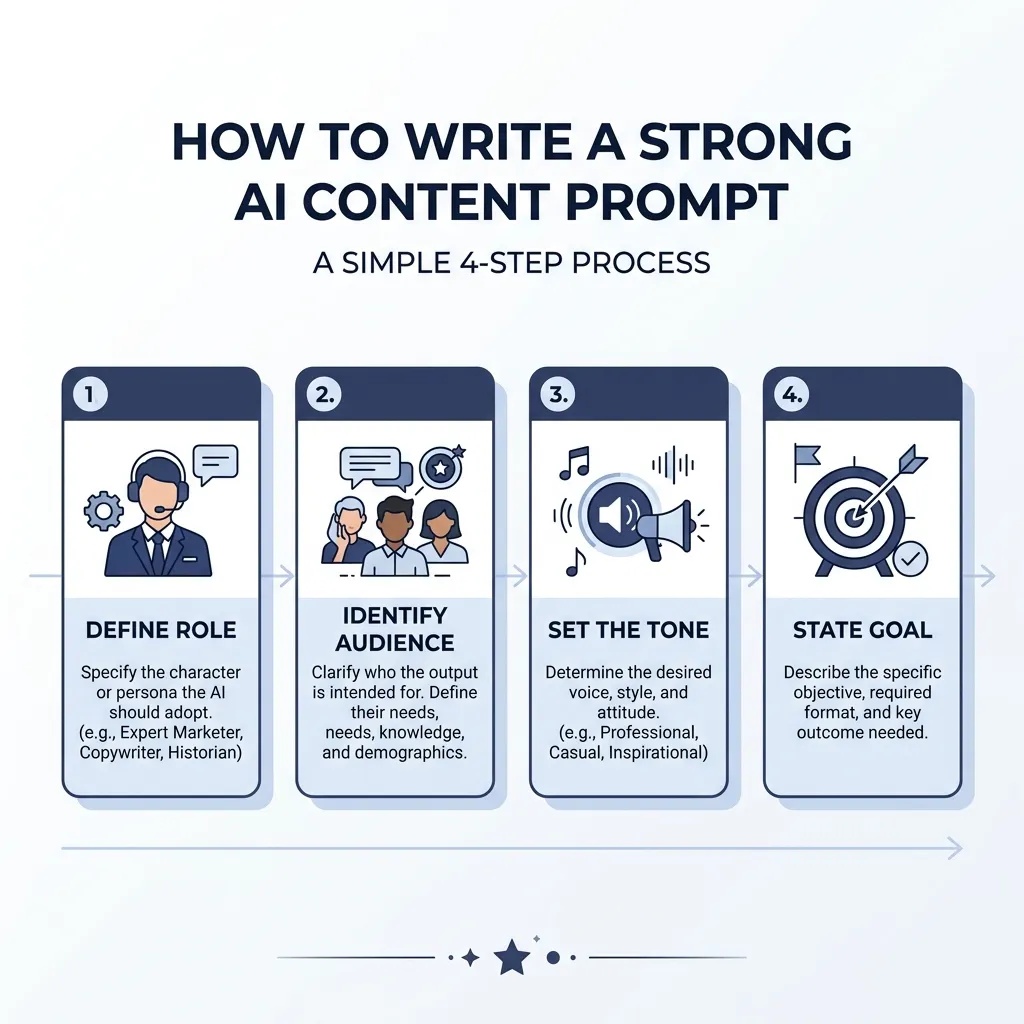
A strong content prompt has six components:
- Role — Who is the AI writing as? (e.g., “You are an email marketing strategist”)
- Audience — Who is it writing for? (e.g., “small business owners with no marketing team”)
- Format — What structure and length? (e.g., “a 600-word blog post intro, three paragraphs”)
- Tone — What voice and register? (e.g., “direct and practical, no jargon”)
- Goal — What does the piece need to accomplish? (e.g., “address the fear of annoying subscribers before introducing the solution”)
- Constraints — What to avoid? (e.g., “no statistics I cannot verify, no corporate-speak”)
Every component you omit gets filled in by the model’s defaults — which trend toward generic, neutral, and safe.
Before and after:
Weak prompt:
“Write a blog post about email marketing for small businesses.”
What you get: a five-paragraph overview of email marketing that could have been written in 2015, with no specific audience, no tension, no voice.
Strong prompt:
“You are an email marketing strategist writing for small business owners with no marketing team. Write a 600-word blog post intro that addresses the fear of annoying subscribers and explains why a 3-email welcome sequence builds trust before selling. Use a direct, practical tone. No jargon. No statistics I cannot verify.”
The structural difference: the strong prompt contains a role, a specific audience with a named emotional state, a format, a clear goal, a tone instruction, and a constraint. None of those required deep technical knowledge — just knowing the six components and filling them in.
The three most common prompt mistakes:
- No audience specificity — the model writes for everyone, which means no one
- No format guidance — output structure varies unpredictably
- No tone or voice direction — output defaults to a flattened, neutral register that reads like no one in particular wrote it
AI Detection, Hallucination, and Editing AI Output Before You Publish
These are the two concerns most AI writing content quietly sidesteps. They’re worth taking seriously.
How AI detection actually works: Tools like Originality.ai or GPTZero flag statistical patterns associated with AI-generated text — predictable word choices, low perplexity, consistent sentence rhythm. They are not detecting AI origin; they’re detecting AI-like patterns. That means heavily templated human writing can trigger a flag, and well-edited, specific AI content often won’t. The fix isn’t a secondary tool. It’s editing for specificity, voice, and accuracy — which you should be doing anyway.
For context on how Google treats AI-generated content, Google’s own guidance on AI and helpful content is direct: the focus is on whether content is helpful and original, not on how it was produced. That doesn’t mean AI content carries no risk — thin, generic output is exactly what helpful content guidance targets.
Hallucination risk: AI tools generate plausible-sounding text, not verified facts. They frequently invent statistics, misattribute quotes, and cite studies that don’t exist — confidently and without any marker that the claim is fabricated. Research on factual accuracy in large language model outputs confirms this is a consistent, measurable failure mode across current models, not an occasional edge case. Any factual claim, statistic, or citation in AI output requires independent verification before you publish it. That’s not optional.
The fix for both problems is the same: edit for specificity, accuracy, and brand voice. Replace generic phrasing with concrete language. Verify every factual claim. Add the kind of specific detail — an example, a qualified opinion, a real number you’ve checked — that AI tools can’t generate reliably.
Maintaining brand voice through this process requires more than reading the draft once. It means replacing the model’s default register with your actual terminology, sentence patterns, and perspective. How brand voice controls work in AI content platforms describes a systematic approach to this — defining voice at the input level rather than correcting for it after the fact.
Before You Publish: AI Content Editing Checklist
- Verify every factual claim independently — AI tools state false information confidently and without any indication something is wrong
- Replace generic phrasing with specific details, examples, or brand-specific language that reflects how you actually communicate
- Check that the piece matches your brand voice — not just that it reads fluently, but that it sounds like you wrote it
- Read the draft aloud to catch unnatural phrasing, repetitive sentence structure, or rhythm that doesn’t match your voice
- Confirm the structure matches the content goal — a blog post and a landing page have different jobs; make sure the draft knows which one it is
- Run a final check for logical gaps or missing context a human reader would notice but the model never flags
- If SEO is the goal, confirm the piece addresses the actual search intent behind the keyword — not just the keyword itself
Fitting AI Into Your Content Workflow (Without Creating More Work)
AI doesn’t eliminate the content workflow. It changes where the work happens. Understanding that before you adopt a tool is the difference between a genuine productivity gain and a new source of frustration.
Here’s how AI tool roles map across a real production process:
- Ideation and research — AI role: generate angles, headline options, outline structures, and question lists. Tool types: general-purpose LLMs work well here; ChatGPT and Claude handle brainstorming and outline generation reliably.
- Drafting — AI role: produce a structured first draft from a detailed prompt. Tool types: general-purpose LLMs for long-form; specialized tools (Jasper, Copy.ai) for templated short-form.
- Editing and refinement — AI role: limited. Use Grammarly for mechanical editing; use a general-purpose LLM with revision prompts for restructuring. Most of this stage is human work, and it takes longer than most demos suggest.
- Optimization — AI role: supportive. Tools like Jasper with SEO mode or a general-purpose LLM prompted against a keyword brief can help with structure and header optimization. The strategy layer — keyword selection, competitor analysis, search intent — requires either human judgment or a dedicated SEO content system.
Honest time accounting: A realistic workflow looks something like this — AI-assisted outline and first draft (30 minutes), human editing for accuracy, voice, and specificity (45 minutes), final SEO and structure check (15 minutes). Total: roughly 90 minutes. That compares favorably to writing from scratch, which typically runs three hours or more for a thorough long-form piece. The editing time is real and non-trivial. Anyone telling you AI eliminates the editing step is describing a workflow where the editing step was skipped, not eliminated.
Where AI writing should be used minimally or not at all:
- Thought leadership requiring original insight or firsthand experience
- Content dependent on recent events or current data
- Highly technical expert content where factual accuracy is non-negotiable
For content that needs to compound over time — building authority, earning links, ranking across a cluster of related topics — why content strategy matters as much as the tool you choose is the longer argument. The short version: the right tool and the wrong strategy still produces content that goes nowhere.
If managing this workflow — tool selection, prompting, editing, SEO optimization, voice consistency — sounds like more overhead than you wanted to take on, that’s the gap Veldora is built to close. The platform runs the full pipeline: keyword research, competitor analysis, brand-matched writing, and multi-step QA, delivered as publish-ready content. Generate a real, strategy-backed post on the free demo and read it yourself — before you spend a dollar. No credit card. No contracts. Just proof.
Frequently Asked Questions
Is AI-generated content bad for SEO?
Not inherently. Google’s guidance is clear: helpful, accurate, original content is what matters — not how it was produced. The risk with AI content isn’t that it’s AI-generated; it’s that it’s often thin, generic, or factually loose. Those qualities hurt SEO regardless of how the content was written. Edit for specificity and accuracy, and the SEO risk largely disappears.
What is the best free AI writing tool for blog posts?
ChatGPT’s free tier (GPT-3.5) is the most genuinely useful free option for long-form blog drafts — no word limits, flexible instructions, and enough capability for most standard content types. Claude’s free tier is a close second, particularly for tone-sensitive writing. Most specialized tool free plans are structured to convert, not to support sustained production use.
How do I make AI content sound less robotic?
The problem is almost always a prompt problem, not a tool problem. Specify the audience, tone, and voice explicitly in the prompt. After drafting, replace generic phrasing with specific language — concrete examples, your actual terminology, the kind of sentence rhythm you use when you write. Reading the draft aloud is the fastest way to find the flat spots.
Can AI writing tools replace human writers?
For content that requires original insight, current knowledge, verified expertise, or a distinctive voice built over years — no. For structured first drafts, ideation, repurposing, and high-volume short-form content — AI tools change how much human writing is required, but not to zero. The editing, judgment, and strategy layer stays human-dependent.
What is the difference between ChatGPT and specialized AI writing tools?
ChatGPT is a general-purpose large language model — flexible, instruction-following, and capable across almost any content type, but with no built-in content workflows or SEO features. Specialized tools like Jasper or Copy.ai wrap a similar underlying model in templates, structured workflows, and (in some cases) SEO guidance. You trade flexibility for structure. For most solo creators, the flexibility of a general-purpose LLM with a strong prompt outperforms a template-constrained specialized tool.
How do I avoid AI detection when using AI content writing tools?
This is the wrong framing. The right question is how to produce content that meets editorial standards — which happens to also reduce AI detection signals. Edit for specificity: replace generic phrases with concrete details, verify every factual claim, and write in a consistent brand voice. Heavily edited, specific, accurate content is much less likely to trigger AI detection tools — and it’s better content regardless of the detection question.
← Back to all posts