Best AI Tools for Article Writing in 2026: Ranked for Long-Form Content
By Veldora AI · July 21, 2026 · Updated July 21, 2026

AI Tools for Article Writing: Ranked and Tested for Long-Form Content
Most AI writing tool roundups are built for search traffic, not for writers who actually publish articles. They mix blog posts with email sequences, product descriptions, and academic papers — then give every tool a “best for” label to avoid naming a winner. If you have already used ChatGPT or Jasper and felt like you were editing more than you were saving, this is not that kind of guide.
This article covers one use case: writing articles. Blog posts, editorial pieces, and long-form content between 800 and 3,000 words. Not ad copy. Not academic papers. Not email sequences.
The tools in this comparison were evaluated on four criteria that actually matter for article writing: long-form coherence, factual reliability, voice consistency, and workflow fit. Not template count. Not integrations dashboard. Not onboarding UX. Every recommendation is defended on those criteria — and there is a named best overall pick.
Key Takeaways
- Best overall AI tool for article writing: Claude (Anthropic) — it produces the most structurally coherent long-form drafts of any tool tested, with lower hallucination risk than most alternatives.
- The criterion that matters most: Long-form coherence. A tool that produces a strong opening paragraph but loses its argument structure by section three is not an article writing tool — it is a paragraph generator.
- The most significant risk: Hallucination. AI tools will fabricate statistics, invent citations, and misattribute quotes. Every AI-generated article draft requires fact-checking before it publishes.
- Free vs. paid: For solo bloggers publishing fewer than four articles per month on general topics, Claude’s free tier or ChatGPT free are genuinely sufficient. For SEO teams producing keyword-targeted content at volume, the economics of paid tools or a managed pipeline shift in favor of specialized options.
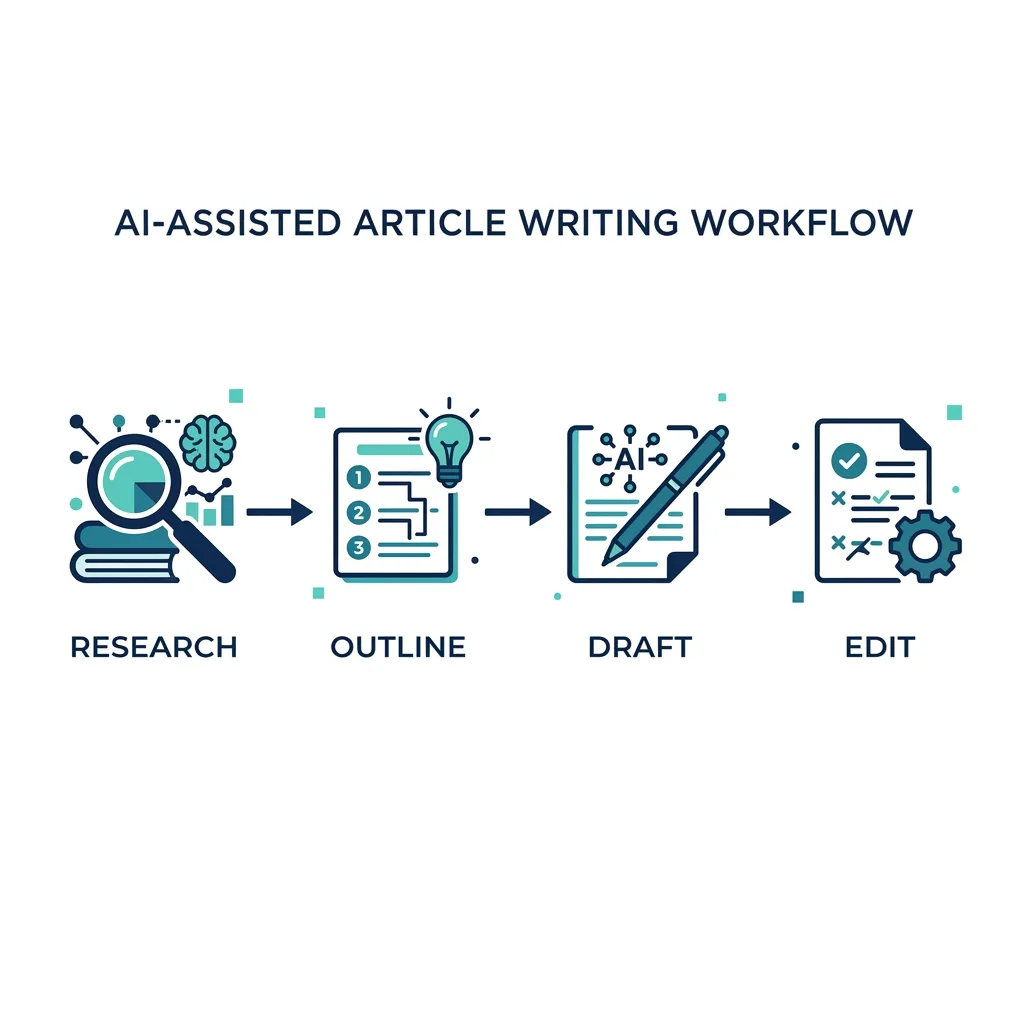
- Workflow matters more than tool choice: AI tools work best when integrated into a structured research-outline-draft-edit process. Single-prompt generation produces the weakest output across every tool tested.
What Makes an AI Tool Actually Good for Article Writing
The criteria most AI writing tool lists use — ease of use, template library, integrations, mobile app — describe what makes a copywriting tool approachable. They have almost nothing to do with whether a tool can produce a coherent 1,500-word article.
Here is what actually differentiates tools for article writing specifically:
Long-form coherence means the tool maintains its structural logic, argument progression, and tone across the full length of an article — not just the first three paragraphs. A tool can score highly on a 300-word product description and completely fall apart when asked to develop and sustain an argument across six sections. This is the most common failure mode in article writing, and it is almost never tested in generic roundups.
Factual reliability means the tool does not fabricate claims. Every tool in this comparison generates from a language model, which means every tool can hallucinate — but they do not all carry the same risk level. Tools with web-grounded output (access to live sources) perform meaningfully better on research-dependent articles than tools generating entirely from training data.
Voice consistency means the output sounds like the same writer from section one to section six. This breaks down more often than writers expect. Introductions often read at one register; body sections drift into filler; conclusions restate the intro almost verbatim. A tool that cannot hold a voice across a full article requires more editing investment to fix.
Workflow fit means the tool supports more than just “paste a prompt, get a draft.” The best article writing tools allow writers to bring in an outline, specify audience and tone, control length at the section level, and revise without starting from scratch. Generation-only tools that produce a single undifferentiated output block are harder to integrate into a real article workflow.
Two categories of tools frequently get conflated in roundups: generation tools (you prompt them and get a full draft) and assistance tools (they support human-written drafts with suggestions, rewrites, and completions). Neither is universally better. Generation tools are faster for writers who start from structure. Assistance tools are better for writers who want to maintain authorial control and use AI to fill gaps or tighten prose.
The tools evaluated here were assessed on article-writing-specific tasks: drafting a 1,200-word article from a structured outline, maintaining argument coherence across sections, and handling a research-dependent topic where hallucination risk is meaningful. A tool that scores well on a 200-word copywriting task did not automatically qualify.
| Criterion | Why It Matters for Articles | How It Was Assessed |
|---|---|---|
| Long-form coherence | Articles require sustained argument development across 1,000–2,500 words — not just strong opening paragraphs | Prompted each tool with a structured outline and evaluated output structure, argument continuity, and section-to-section logic |
| Factual reliability | Article writers publish under their name — fabricated statistics or invented citations damage credibility | Evaluated on research-dependent prompts; noted which tools cited sources vs. generated from training data alone |
| Voice consistency | Generic AI drift across sections requires significant editing investment to correct | Assessed tone and register consistency from introduction through conclusion across multi-section drafts |
| Workflow fit | Generation-only tools require more editorial reconstruction than tools that support outline-driven, iterative drafting | Evaluated whether tools support structured inputs (outline, tone notes, audience spec) beyond single-prompt generation |
For writers evaluating tools that go beyond generation into strategy and research grounding, strategy-backed writing describes what that integration looks like when it is built into the pipeline rather than bolted on.
The Best AI Tools for Article Writing: Ranked Recommendations
The six tools reviewed here were selected because they are genuinely relevant to article writing — not because they are the most-searched names. Each review uses the same structure: primary strength for articles, key limitation, best writer type, and pricing reality.
The table below uses the four criteria from the framework above. Scan it to identify your fit before reading the full reviews.
| Tool | Best Writer Type | Long-Form Coherence | Factual Reliability | Free Plan | Starting Price |
|---|---|---|---|---|---|
| Claude (Anthropic) | Solo bloggers, freelancers | High | Moderate (web access on paid) | Yes | ~$20/mo (Pro) |
| ChatGPT (OpenAI) | Generalist writers, SEO teams | Medium–High | Moderate (web access on Plus) | Yes | $20/mo (Plus) |
| Perplexity AI | Journalists, researchers | Medium | High (source-grounded) | Yes (limited) | $20/mo (Pro) |
| Jasper AI | SEO content teams | Medium | Moderate hallucination risk | No | ~$49/mo |
| Gemini (Google) | Teams in Google ecosystem | Medium | Moderate | Yes (limited) | $19.99/mo (Advanced) |
| Grammarly | Assistance-mode writers | N/A (assistance only) | High (does not generate claims) | Yes | $12/mo (Pro) |
Best Overall: Claude (Anthropic)
Claude is the best AI tool for article writing among the options tested, and the reasoning is specific: it produces the most structurally coherent long-form drafts. When given a structured outline with tone notes and a target audience, Claude follows the structure reliably across all sections — it does not compress the second half of an article or drift into generic summary prose the way most tools do past the 800-word mark.
Claude also handles nuance in prose better than its primary competitors. It does not default to bullet-point summaries when the prompt calls for connected prose, which is a persistent problem in ChatGPT outputs for article-length content.
Primary strength: Long-form structural coherence and prose quality under structured prompting. Key limitation: Claude’s free tier does not include web access, which means it generates from training data on research-dependent topics. Hallucination risk rises on anything time-sensitive or statistics-heavy. The paid Pro tier includes web search, which materially improves factual reliability. Best for: Solo bloggers, freelance writers, anyone prioritizing prose quality over SEO integration. Pricing reality: The free tier is usable for general-topic articles. See Claude’s current pricing before committing to Pro — the cost-per-article math works out favorably at even moderate publishing volume.
ChatGPT (OpenAI)
ChatGPT is the most widely used AI writing tool for a reason: it is flexible, it responds well to iterative prompting, and the Plus tier’s web access makes it more reliable on current-events or research-dependent content than the free version.
For articles specifically, ChatGPT Plus performs at a high level on structured prompts. The limitation that article writers hit most often is voice drift — extended outputs have a tendency toward a uniform “informational blog” register that can be hard to distinguish from generic content. Introductions and transitions are where this shows up most.
Primary strength: Flexibility and iterative prompting — you can prompt section by section, revise inline, and course-correct without starting over. Key limitation: Voice consistency breaks down in longer pieces. Raw ChatGPT output often reads as recognizably AI-generated at the article level even when individual paragraphs sound natural. Best for: Writers who iterate heavily and want maximum control over the drafting process. Pricing reality: Free tier is adequate for occasional drafts; Plus at $20/month adds web access and higher output limits, which matter at volume.
Perplexity AI
Perplexity is the outlier in this group — it is a source-grounded research and answer tool, not a traditional article generator. For journalists and researchers writing factually dense content, this matters significantly. Perplexity cites sources inline, which means hallucinated claims are easier to catch and the output is grounded in retrievable information rather than model training data.
The tradeoff: Perplexity does not produce article-length drafts natively. It excels at the research and outline stages and at drafting individual sections with source-backed claims. Full-length article generation is weaker than Claude or ChatGPT. Key limitation: Not a full-article generation tool — best used as a research and drafting aid rather than a primary generator. Best for: Journalists, researchers, and writers working in factually complex topic areas.
Jasper AI
Jasper is widely marketed as a content team tool, and its feature set supports that positioning — it offers structured templates, brand voice inputs, and integrations with SEO tools including Surfer SEO. For SEO content teams producing templated blog posts at volume, Jasper’s workflow tooling is genuinely useful.
For article writing specifically, Jasper produces solid first drafts for structured blog posts, but long-form articles over 1,500 words tend to lose coherence in the second half without meaningful human intervention. The template-driven approach that makes it efficient for short-form content becomes a constraint when an article requires sustained original argument development.
Key limitation: Coherence degrades in longer pieces; output quality is more consistent on templated, keyword-targeted posts than on argument-driven articles. Best for: SEO content teams running high-volume, keyword-targeted blog production. Pricing reality: Starts around $49/month — the economics require consistent volume to justify over free alternatives.
Gemini (Google)
Gemini is a capable general-purpose model with strong integration into Google Workspace. For teams already working in Google Docs and Sheets, the workflow integration has genuine value. As a standalone article writing tool, Gemini’s output quality is comparable to ChatGPT for general topics, with similar voice consistency limitations at article length.
Key limitation: Does not meaningfully outperform Claude or ChatGPT on article writing tasks; the primary value is Google ecosystem integration. Best for: Writers and teams embedded in Google Workspace who want AI assistance without switching tools.
Grammarly (Assistance Mode)
Grammarly belongs in a different category from the generation tools above — it is an assistance tool, not a generator. It does not write articles; it helps human writers refine them. For writers who want to maintain full authorial control and use AI to tighten prose, improve clarity, and maintain tone consistency, Grammarly’s AI-assist features are the most reliable in this category.
Primary strength: Improves human-written drafts without generating fabricated content — the hallucination risk is effectively zero because it is not generating claims. Best for: Freelancers and journalists who write their own drafts and want AI-assisted editing rather than AI-generated content.
Factual Accuracy and Hallucination Risk in AI-Generated Articles
Hallucination is not a minor footnote for article writers — it is a central evaluation criterion. A peer-reviewed analysis of LLM hallucination behavior documents that large language models produce factually incorrect content at measurable rates, and the risk is higher on specific claim types that show up constantly in articles: statistics, citations, and named-entity descriptions.
The three hallucination failure modes article writers should specifically plan for:
Fabricated statistics. AI tools frequently generate statistics with plausible-sounding source attributions that do not exist. A sentence like “According to a 2022 McKinsey report, 67% of marketers now use AI tools” may appear in an AI-generated article with no corresponding real source. The citation sounds credible. The stat is invented.
Invented citations. AI models generate citation-style references (author names, journal titles, publication years) that look real and are not. This is especially common when an article prompt touches academic or research topics. Do not publish AI-generated citations without verifying each one against the actual source.
Inaccurate named-entity descriptions. AI tools misattribute quotes, describe companies incorrectly, and confuse individuals with similar names. Any article that names real people, companies, or organizations requires verification of every specific claim about them.
Which tools carry higher vs. lower risk:
Perplexity AI carries the lowest hallucination risk for research-dependent articles because its outputs are source-grounded — it retrieves from live web sources and cites inline. Claude Pro and ChatGPT Plus, with web access enabled, perform meaningfully better on factual reliability than their free counterparts. Jasper and Gemini generate primarily from training data for most prompts, putting the full verification burden on the writer.
Built-in QA processes matter here. Standalone AI tools do not have a verification layer — that responsibility sits entirely with the writer. A pipeline that includes a multi-step QA process addresses this structurally rather than leaving it as a manual step the writer may or may not take.
Pre-publish fact-checking checklist for AI-generated article drafts:
- Verify all statistics and data points against the primary source — do not accept the citation the AI provides at face value
- Confirm that any named individuals, companies, or organizations exist and are described accurately
- Check that all dates, events, and historical claims are accurate and correctly sequenced
- Validate every citation — search for the actual source; if it does not exist, remove the claim or find a real supporting source
- Flag any specific claims that cannot be traced to a verifiable source before the article publishes
- Check any quoted statements — AI tools frequently fabricate or misattribute quotes from real people
AI Detection Risk and Keeping Your Writing Voice
The honest answer to “will my AI-generated article be detected?” is: probably, if you did not edit it.
Google’s documented position, detailed in their Search Central guidance on AI-generated content, focuses on helpfulness and quality — not on penalizing AI-assisted content categorically. The practical implication: poorly edited, generic AI output is the problem. Treating AI detection avoidance as a separate goal from writing quality is the wrong frame.
Of the tools tested, Claude produces the most human-sounding long-form output at a draft level — its sentence variety, paragraph rhythm, and handling of transitions are stronger than the default output from ChatGPT or Jasper. But no tool produces output that reads as distinctively human-authored without meaningful editing.
Where most AI article drafts break down, and where to intervene:
The introduction is where AI output is most detectable. Models default to broad-to-narrow topic framing (“In today’s digital landscape…”) that reads as generic because it is. Rewrite the introduction from your own angle before anything else.
Transitions between sections are the second failure point. AI-generated transitions tend toward explicit, mechanical connectors (“Now that we have covered X, let us move on to Y”). Replace these with logic-forward connections that move the argument.
Conclusions almost always restate the introduction. Replace AI-generated conclusions with a forward-looking observation, a named next step, or a genuine editorial opinion.
Voice consistency across a full article is harder to maintain with AI assistance than most tools’ marketing suggests. Maintaining it requires giving the tool consistent style inputs — not just a tone word like “conversational,” but specific guidance on sentence length, how you handle examples, what you avoid. Preserving your writing voice in AI-assisted content requires deliberate input design, not just post-draft editing.
Practical editing moves that make AI article drafts read as human-written:
- Rewrite the introduction entirely — use a specific observation, a concrete example, or a direct statement of position rather than the AI’s broad opener
- Replace mechanical transitions with argument-forward connectors that assume the reader has followed the logic
- Add at least one specific, verifiable example per section that the AI did not generate
- Cut filler summary sentences at the end of each section — they read as padding and they are
- Insert one personal or practitioner observation per major section — something the model could not have sourced
- Read the final draft aloud; where it sounds like a committee wrote it, rewrite those sentences in your own voice
A Practical AI Article Writing Workflow: Research to Published Draft
The writers who get the most from AI assistance for articles are not using single-prompt generation. They are using AI tools at specific stages of a structured workflow — with different tools for different jobs. Here is the workflow that produces the best results.
-
Research and topic framing — Before drafting, ground your article in actual source material. Use Perplexity AI to identify credible sources, current data, and existing coverage on your topic. Do not rely on the generation tool to supply facts during drafting. Your job at this stage is to collect the claims you want to make and the sources that support them.
-
Outline and structure — Bring your research into Claude or ChatGPT and ask for an outline based on your specific argument, not a generic article structure. Evaluate the AI-generated outline before using it: does it reflect your actual position? Are the section titles specific to your angle, or are they generic heading placeholders? Rewrite sections that are too generic before drafting.
-
Drafting with structured prompts — Single-line prompts produce the weakest article drafts. A structured prompt that includes your outline, target audience, key claims to support, tone guidance, and word count target per section produces materially better output. The difference between prompting “write an article about remote work productivity” and supplying a full outline, three specific claims to support, a defined audience (mid-level managers), and a conversational-but-direct tone is significant at every tool level.
-
Editing and voice correction — Apply the editing moves from the section above. Rewrite the introduction, replace transitions, add specific examples, cut summary filler. Plan for this stage to take 30–60 minutes on a 1,500-word draft — it is not optional if quality matters.
-
Fact verification — Run every factual claim through the pre-publish checklist before moving to the next stage. Do not leave verification for last.
-
SEO optimization — This is where standalone AI writing tools typically end their support. None of the tools in this comparison natively integrates live keyword research, competitor analysis, or SERP-grounded content strategy into the article draft. That step requires either a separate SEO tool layer (Surfer SEO, Clearscope) or a pipeline that integrates strategy from the start. For writers who want to understand the compounding effect of SEO-integrated article strategy, this resource on SEO content that builds over time covers the strategic layer that standalone AI tools do not address. Veldora’s strategy-backed writing pipeline integrates live keyword research and competitor analysis into each piece — which is a different category than adding an AI tool to your existing workflow.
Which AI Tool Is Right for Your Article Writing Situation
If you have read this far, you have enough information to make a confident decision. The matrix below gives you the fast answer by writer type.
| Writer Type | Publishing Volume | Top Priority | Recommended Tool | Why |
|---|---|---|---|---|
| Solo blogger | Low (1–4 posts/month) | Prose quality, low cost | Claude (free tier) | Best long-form coherence at zero cost; web access on paid tier reduces hallucination risk for research topics |
| SEO content team | High (10+ posts/month) | Volume, keyword targeting | Jasper + Surfer SEO | Workflow tooling and SEO integrations support structured, high-volume production; budget the editing time |
| Freelance writer | Medium, varied clients | Voice flexibility, multi-client | Claude Pro or ChatGPT Plus | Both handle varied tone instructions well; Claude holds voice better across longer pieces |
| Journalist or researcher | Low–medium | Factual accuracy above all | Perplexity AI + Grammarly | Source-grounded output reduces fabrication risk; Grammarly for editorial polish without adding hallucination risk |
On the paid vs. free question:
For solo bloggers publishing general-topic content at low volume, the free tiers of Claude and ChatGPT are genuinely sufficient — the paid tiers add web access and higher limits, which only matter if you are publishing research-dependent content or at higher volume.
For SEO content teams at volume, the cost calculus shifts. A $49/month tool that reduces per-article editing time by an hour across 20 articles is a different proposition than the same tool for a writer publishing four times a month.
For SMB owners and marketing teams who find the piecemeal AI tool workflow — tool for drafting, tool for SEO, tool for editing, manual QA — too inconsistent or time-intensive, that is a different problem than choosing the right AI writing tool. Veldora operates as a managed content pipeline: strategy, keyword research, brand-matched writing, and QA as a single automated system. It is not an AI writing tool you use on demand — it is the alternative to assembling that workflow yourself.
Generate a real, strategy-backed post on the free demo and read it yourself — before you spend a dollar. No credit card. No contracts. Just proof.
Frequently Asked Questions
Can AI actually write a full article, or does it only help with short pieces?
AI tools can generate full article-length drafts — but quality varies significantly by tool and by how structured your prompt is. The main failure point for full-length articles is coherence in the second half: most tools produce stronger openings than conclusions, and argument development across six or more sections requires deliberate prompt structure. Claude handles this better than most alternatives when given a structured outline input.
Will AI-generated articles be penalized by Google or flagged as machine-generated?
Google’s published guidance focuses on content quality and helpfulness, not on penalizing AI-assisted content as a category. The practical risk is not a blanket AI penalty — it is publishing low-quality, generic content that happens to be AI-generated. Heavily edited AI drafts that add original perspective, accurate information, and genuine value are not the target of Google’s helpful content guidance. Unedited, generic AI output is.
Are paid AI writing tools worth it when Claude and ChatGPT are free?
For low-volume, general-topic writing, no — the free tiers are sufficient. The case for paid tools strengthens when you need web access for factual accuracy on current topics (both Claude Pro and ChatGPT Plus), SEO workflow integration (Jasper with Surfer SEO), or higher output limits at publishing volume. The honest math: if you are spending significant time editing free-tier output, the paid tier may cost less than that time.
How do I keep my writing voice when using AI assistance for articles?
The most effective approach is to give the tool explicit voice inputs at the prompt stage — not just a tone adjective, but specific guidance on sentence length, how you handle examples, what register you avoid. Then plan to rewrite the introduction and transitions in your own voice regardless of what the tool produces. Raw AI drafts do not hold a distinctive authorial voice; editing does.
Can I trust AI-written content to be factually accurate, or do I need to verify everything?
Verify everything that is a specific claim. AI tools fabricate statistics, invent citations, and misattribute quotes at a meaningful rate — this is a documented behavior of large language models, not an occasional edge case. The verification checklist in the factual accuracy section above covers the specific claims most likely to be fabricated. Source-grounded tools like Perplexity carry lower risk, but they are not a substitute for verification.
Which AI tools are best for SEO article writing specifically?
No standalone AI writing tool fully integrates SEO strategy into the drafting process. The closest is Jasper when paired with Surfer SEO, which allows keyword and SERP guidance to inform the draft. ChatGPT and Claude can incorporate keyword guidance through prompt instructions, but they do not pull live search data natively. A full SEO-integrated article workflow requires either a separate SEO tool layer or a pipeline built around strategy from the start.
← Back to all posts